There’s a line most companies haven’t crossed yet, and it’s not about having AI.
It’s about what the AI actually does.
For the past few years, “AI adoption” meant giving employees a chatbot, a writing assistant, or a dashboard with predictive analytics. The AI answered questions. Humans still made the decisions, ran the workflows, and did the follow-through.
That’s changing fast, and 2026 is the year where the gap between companies that understand the shift and companies that don’t will start to show up in actual business results.
The shift is calledagentic AI. Here’s what it actually means, why it matters to your business right now, and what to do about it.
What “Agentic AI” Actually Means (No Jargon)
An AI agent doesn’t just respond. It acts.
Give a standard AI a task, and it gives you an output. Give an agentic AI system a goal — it figures out the steps, uses the tools it has access to (databases, APIs, browsers, internal systems), executes across those steps, checks its own work, and adjusts when something goes wrong.
Think of the difference between an assistant who answers your question and an assistant who runs the whole project.
That’s what’s happening right now inside enterprise software. AI is moving from a layer you query to a layer that operates — handling customer service tickets end-to-end, writing and testing code, managing procurement approvals, detecting and responding to security threats — without waiting for a human to press “go” on each step.
The Numbers Business Leaders Should Know
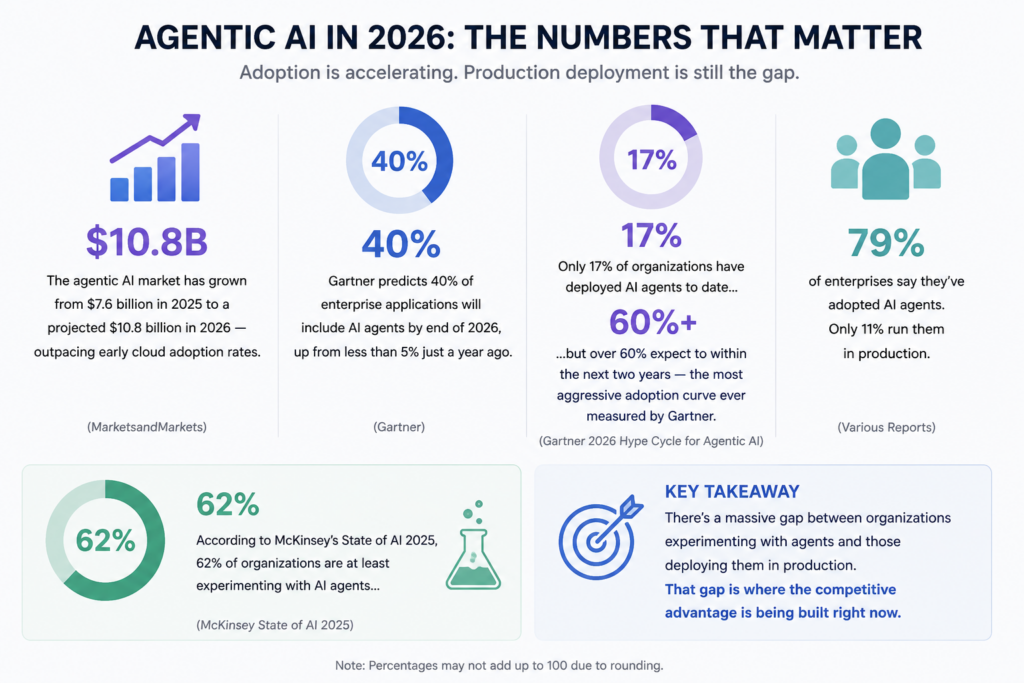
This isn’t speculation. Here’s where the market actually stands in 2026:
That last number is the one to pay attention to. There’s a massive gap between organizations experimenting with agents and organizations actually deploying them in ways that move business metrics. That gap is where the competitive advantage is being built right now.
Why 2026 Is Different From Every Prior Year of “AI Hype”
Here’s what’s actually changed.
For most of 2023 and 2024, agentic AI was a compelling demo. The models were capable, but the infrastructure around them — the orchestration frameworks, governance tools, security layers, integration standards — wasn’t production-ready. Most pilots stalled.
That’s no longer the case.
The architecture has matured. Enterprises now have the orchestration frameworks, governance models, and observability platforms required to deploy AI agents in real workflows without losing control or accountability. The challenge in 2026 isn’t “can we build this?” — it’s “are we executing well enough?”
The ROI is measurable now.PwC estimates that AI agents can take on roughly half of the tasks in many business functions. That’s not a benchmark score — that’s an operational reality that forward-leaning organizations are already building around.
Where Agentic AI Is Actually Working Right Now
The use cases that have moved past pilot stage and into production:
Software Engineering Agent-assisted development is no longer about autocomplete. Development teams are deploying agents that write code, run tests, identify bugs, propose fixes, and open pull requests — reducing review cycles and shipping time in ways that compound over quarters, not years.
Customer Operations The most mature enterprise deployment area. AI agents handle intake, routing, research, and resolution for a significant percentage of support volume — not just the simple tickets, but complex multi-step requests that previously required a human to dig through four systems.
Financial Monitoring and Controls Agents that watch financial data in real time, flag anomalies, execute pre-approved responses (blocking a transaction, escalating a variance), and log the full decision trail for audit. The finance teams at organizations running these systems have shifted from catching problems after the fact to preventing them in the first place.
Security and Threat Response Autonomous agents that detect anomalous behavior, cross-reference threat intelligence, and initiate response protocols — all before a human analyst opens their laptop. Security teams are still in the loop, but their role has shifted from first responder to decision-maker on escalations.
The Honest Problem: Why Most Deployments Stall
Gartner has flagged that over 40% of agentic AI projects are at risk of cancellation by 2027. The reasons are consistent: escalating costs, unclear business value, and inadequate governance.
Here’s what’s actually happening in organizations that are stuck:
They started with the technology, not the workflow. The question “what can our AI agent do?” is less useful than “what specific business process costs us the most in time, errors, or headcount — and can an agent own part of it?” The organizations running agents in production started with the second question.
They underestimated the 80/20 problem. PwC’s analysis is direct: technology delivers about 20% of the value in an agentic initiative. The other 80% comes from redesigning work around it. Organizations that deployed agents into unchanged processes got unchanged results, just faster.
They skipped governance. Agents that can act can also act wrong — at scale, quickly, with consequences. The organizations that have successfully expanded agent autonomy over time are the ones that built governance into the design from day one: clear boundaries, audit trails, escalation paths, human checkpoints at high-stakes decision points.
What “Governance” Actually Means for Agents (Practically)
This is the part most leadership discussions skip, because it sounds like a compliance problem. It isn’t.
Agent governance is about knowing what your agents are doing, setting the right boundaries, and building the kind of accountability structure that lets you expand agent autonomy over time with confidence rather than restrict it after something goes wrong.
In practice, that means:
Permissions and scope boundaries — what systems can the agent access? What actions can it take independently versus what requires approval?
Audit trails — every agent action logged, with enough context to understand why it happened and who (or what) authorized it.
Escalation design — clear criteria for when an agent hands off to a human, and a handoff that doesn’t drop context.
Governance agents — a growing practice in 2026: deploying monitoring agents whose job is to watch other AI systems for policy violations and anomalous behavior.
The organizations that get this right don’t just reduce risk. They build the institutional confidence to deploy agents in higher-value scenarios — a compounding advantage.
The Strategic Decision You’re Actually Making
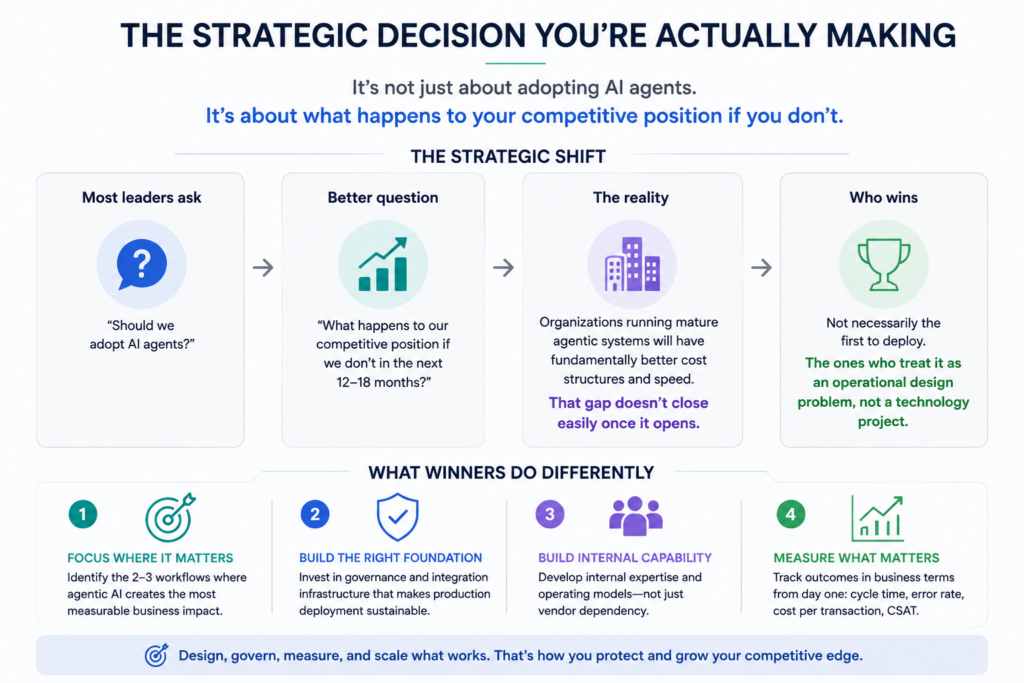
Most business leaders frame the agentic AI question as: should we adopt AI agents?
The better frame is: what happens to our competitive position if our peers deploy agentic systems in the next 12-18 months and we don’t?
In areas like customer operations, software development, and financial controls, organizations running mature agentic systems are operating with fundamentally different cost structures and speed profiles than those that aren’t. That gap doesn’t close easily once it opens.
The organizations that will come out ahead aren’t necessarily the first to deploy agents. They’re the ones that treat this as an operational design problem, not a technology project. That means:
Identifying the two or three workflows where agentic AI creates the most measurable business impact
Investing in the governance and integration infrastructure that makes production deployment sustainable
Building internal capability, not just vendor dependency
Measuring outcomes in business terms (cycle time, error rate, cost per transaction) from day one
The Bottom Line
Agentic AI is past the point of being a “watch this space” topic.
The market is moving. The infrastructure is ready. The early deployments have produced the playbooks. The organizations sitting in pilot mode through the rest of 2026 aren’t being cautious — they’re ceding ground.
The question isn’t whether AI agents will be part of how enterprise businesses operate. They already are. The question is whether your organization is building the capability to deploy them deliberately, govern them responsibly, and scale what works — or whether you’ll be catching up to organizations that started 18 months earlier.
That’s the decision in front of you right now. Curious where AI agents could fit in your business? Let’s find out together →
Frequently Asked Questions
Q1: What is agentic AI and how is it different from regular AI?
Regular AI responds to a prompt — it answers a question, generates text, or completes a task when you ask. Agentic AI acts autonomously toward a goal. It plans the steps, uses tools (like APIs, databases, or browsers), executes across multiple actions, checks its own output, and adjusts when something goes wrong — without a human triggering each step. The shift is from AI as a tool you use to AI as a system that operates on your behalf.
Q2: Is agentic AI ready for enterprise deployment in 2026?
For specific, well-defined workflows — yes. Customer support triage, software development assistance, financial monitoring, and security threat response all have mature production deployments in 2026. That said, Gartner notes that only 17% of organizations have fully deployed AI agents, and fully autonomous agents across complex, high-stakes workflows are still not ready for most enterprises. The key is scoping deployments to the right use cases and building proper governance before expanding.
Q3: What are the biggest risks of deploying AI agents in a business?
The three most common failure points are: (1) unclear business value — deploying agents without measurable outcomes tied to real business metrics; (2) insufficient governance — no audit trails, escalation paths, or human checkpoints for high-stakes decisions; and (3) unchanged workflows — dropping agents into existing processes without redesigning the work around them. Gartner warns that 40%+ of agentic AI projects risk cancellation by 2027 for exactly these reasons.
Q4: How much does agentic AI cost to implement?
Costs vary significantly by scope, vendor, and how much custom integration is required. Organizations that start with a single, well-defined workflow and build from there report the best ROI. The bigger cost risk isn’t licensing — it’s the time and resources spent on failed pilots. PwC’s research shows that 80% of the value in an agentic initiative comes from workflow redesign, not technology spend, which means your largest investment should be in process and change management, not software.
Q5: What industries are seeing the most traction with agentic AI right now?
Software and technology companies lead adoption, with AI agents most mature in software engineering and IT service management. Financial services organizations are deploying agents for monitoring, fraud detection, and compliance workflows. Customer-facing industries like retail, insurance, and telecoms are seeing strong results in customer operations. Healthcare is advancing in knowledge management and administrative workflows, while remaining cautious in clinical settings due to governance requirements.
Q6: How do I start with agentic AI without a large tech team?
Start with one workflow where the pain is clear and measurable — a process that costs significant time, has high error rates, or requires repetitive human effort. Many enterprise software platforms (Salesforce, ServiceNow, Microsoft 365) now have embedded AI agent capabilities that don’t require building from scratch. Pilot it with a governance design in place from day one, measure the outcome in business terms, and scale only what works. You don’t need a large AI team to start — you need a clear problem and disciplined measurement.
Generative AI SEO combines the power of cutting-edge artificial intelligence with traditional search engine optimization techniques. By leveraging AI content models, you can produce relevant, engaging, and optimized content that satisfies both algorithms and human readers. In this guide, you will learn how to rank for important Generative AI keywords, structure your pages for maximum impact, and drive sustainable organic traffic.
Why Generative AI Matters for SEO
Generative AI is transforming SEO by enabling smarter, data-driven content strategies that align with evolving search engine algorithms and user preferences.
Enhanced Keyword Discovery AI models can surface niche and long-tail keywords based on real-time search trends and user queries, helping you target opportunities that competitors overlook.
Content Personalization By analyzing user behavior and intent, Generative AI can tailor content recommendations, boosting relevance and engagement for different audience segments.
Semantic SEO Optimization AI understands relationships between topics and entities, so you can build semantically rich content that search engines reward with higher visibility.
Accelerated Content Freshness Automate updates and expand existing articles with the latest data and insights, ensuring your pages stay current and authoritative in fast-moving niches.
Generative Engine Optimization (GEO) Go beyond traditional SEO by structuring content specifically for AI models and generative search platforms, focusing on clarity, context, and authority.
Actionable Insights and Testing Generative AI tools can suggest on-page improvements and run rapid A/B tests on titles, headings, and meta descriptions, helping you iterate toward better performance continuously.
By weaving Generative AI into your SEO workflow, you unlock deeper audience insights, personalized user experiences, and scalable content production that keeps you ahead of the curve.
According to WSJ, over 40% of users report completing searches entirely within AI chat interfaces, reducing traditional click-throughs
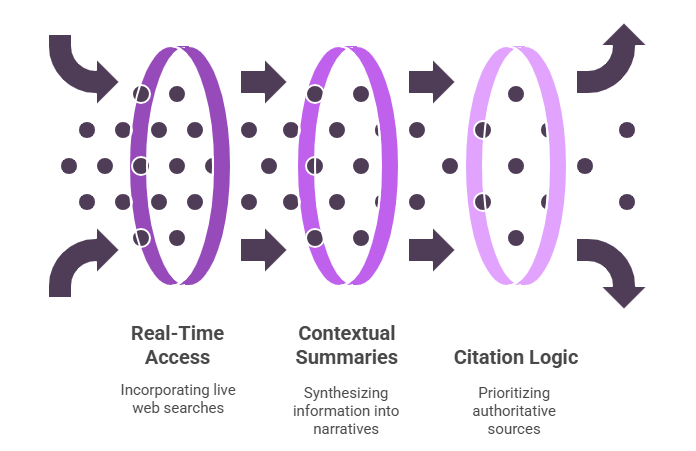
How AI Search Engines Work
Training Data vs. Real-Time Access AI models are built on extensive, pre-trained datasets but often incorporate live web searches to provide up-to-date information and ensure responses reflect the latest developments.
Contextual Summaries Instead of returning ranked lists of URLs, AI search engines synthesize information into concise, narrative answers that draw on expert blogs, forums, and structured pages to meet user needs directly.
Citation Logic Unlike traditional link-based algorithms, AI prioritizes content from authoritative, credible sources and evaluates clarity and completeness of answers, ensuring users receive reliable information rather than simply the most linked pages.
Keyword Research for Generative AI Content
Seed Keywords
Begin with broad, high-volume terms that define your content’s core topic.
Examples:
“Generative AI optimization”
“AI-powered content strategy”
“Generative AI search trends”
Long-Tail Keyword
These are more specific phrases that capture niche topics or common user queries.
Examples:
“how to get featured in AI search summaries”
“tools to structure content for AI discoverability”
“optimize blog posts for ChatGPT visibility”
Competitor Analysis
Use platforms like Ahrefs, SEMrush, or Ubersuggest to research what keywords top-ranking sites are targeting for generative AI SEO.
Look for gaps such as:
Missing FAQs
Outdated tool recommendations
Lack of schema implementation guides This gives you an opportunity to create better-rounded content.
Search Intent Mapping
Segment your keywords based on what the searcher is likely trying to achieve:
Informational Intent • “What is AI search optimization” • “How does generative AI impact SEO rankings”
Transactional Intent • “Buy AI content optimization tool” • “Best LLM-friendly SEO platforms for agencies”
On-Page Optimization Techniques
On-page optimization ensures each page clearly communicates its purpose to both users and search engines. By fine-tuning elements like titles, headers, and images, you improve crawlability, user experience, and ultimately your rankings.
Optimizing Images and Alt Text
• Compress images to improve page load speeds and reduce bounce rates. • Provide descriptive alt text that reflects the image and includes keywords where relevant. Example:alt="container garden with tomato and pepper plants on an apartment balcony"
Title Tags and Meta Descriptions
• Keep your title under 60 characters and front-load it with the main keyword. Example (Urban Gardening): “Urban Gardening Guide: Grow Veggies on Your Balcony” • Write a meta description of 150–160 characters that naturally includes the primary keyword early. Example (Urban Gardening): “Learn easy balcony gardening tips to grow fresh vegetables in small spaces and boost your home harvest.”
Header Structure (H1, H2, H3)
• Use a single H1 that matches your page’s main topic. Example:<h1>Urban Gardening Guide: Grow Veggies on Your Balcony</h1> • Break content into logical sections with H2 headings, then use H3 for sub-points to aid readability and SEO.
Creating High-Quality Generative AI Content
User Intent Alignment
Answer reader questions comprehensively.
Use conversational tone and actionable steps.
Content-Length and Depth
Aim for 1,200+ words for cornerstone pieces.
Include examples, data points, and case studies.
Readability and Formatting
Use short paragraphs, bullet lists, and call-out boxes.
Embed table of contents for long articles to improve navigation.
Off-Page SEO and Link Building
Guest Posts: Contribute to AI and marketing blogs with a backlink to your guide.
Resource Roundups: Get featured in “Top AI Tools” lists.
Social Shares: Promote excerpts on LinkedIn and Twitter using hashtags like #GenerativeAISEO and #AIContent.
Investing in generative AI SEO can deliver a 3–5× uplift in discovery across both traditional and AI search channels within six months.
Key Takeaways
Generative AI is changing search behavior, with tools like ChatGPT and Google’s SGE shaping how users find and consume content.
To rank in AI-driven search, focus on clarity, structured content, and credibility — not just keywords.
Use long-tail and intent-based keywords to target specific user queries that generative models often reference.
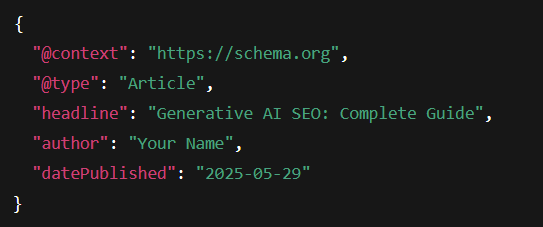
Schema markup and structured formatting help AI models understand and cite your content more effectively.
E-E-A-T signals (Experience, Expertise, Authority, Trust) are critical for gaining visibility in AI responses and summaries.
Optimizing for AI requires ongoing testing, prompt engineering, and monitoring for AI visibility metrics.
Need help optimizing your website for AI visibility? Get a free 30-minute consultation with our AI SEO experts and learn how to structure your content for maximum discoverability across search engines and generative tools.
AI Search Optimization FAQs
How does Generative AI SEO differ from traditional SEO?
Traditional SEO targets ranking in link-based search results (e.g., Google’s blue links).
Generative AI SEO prioritizes being referenced directly in AI summaries and chat answers by optimizing for clarity, structure, and machine readability.
Will Google or other search engines penalize AI-generated content?
AI-generated drafts themselves aren’t penalized, but search engines require:
E-E-A-T Signals: Demonstrate expertise, experience, authority, and trustworthiness.
Originality: Add unique insights, data, or examples.
Quality: Human editing for fact-checking, coherence, and brand voice.
How do I prevent AI hallucinations or inaccuracies?
Human Review: Incorporate a review stage where experts validate facts and refine tone.
Controlled Prompts: Use precise, constrained prompts and include source lists when possible.
How long does it take to see results from Generative AI SEO?
Initial Movements: 4–8 weeks for AI interfaces to begin surfacing improved content.
Significant Gains: 3–6 months of consistent optimization, fresh content updates, and backlink building.
Do backlinks still matter in AI-driven search?
Yes. While AI overviews cite content based on clarity and authority, credible backlinks remain a key E-E-A-T signal, boosting your content’s perceived trustworthiness.
How can I stay ahead as AI search evolves?
Continuous Learning: Follow AI search updates from Google, OpenAI, and industry blogs.
Iterative Testing: Regularly A/B test prompts, titles, and metadata.
Invest in Unique Assets: Publish original research, interactive tools, and expert interviews that AI can’t replicate.
Studies show that the AI in marketing market size is expected to reach a value of $217.33 billion by 2034.
GenAI is much more than a buzzword and requires really reconsidering the way businesses connect with their audiences. GenAI can also deliver advanced personalization and create dynamic content at scale.
AI in digital marketing is radically changing the online advertising industry. Today, marketers can rely on artificial intelligence to deliver more effective campaigns and gain an edge over the competition. Common aspects of the industry benefit greatly from AI, from targeted ad design to predictive analytics.
Read more to explore how AI is pushing the boundaries of innovation.
AI in digital marketing for targeted ads
AI-driven platforms can deliver many valuable insights that help marketers get a jump start on campaigns. As well, artificial intelligence can quickly analyze vast amounts of customer data. Algorithms can also identify customer patterns and preferences. These processes gather information for highly targeted advertising campaigns.
Ads that are highly personalized are more likely to resonate with intended audiences. Therefore, engagement rates are therefore more likely to soar. That can only mean one thing: better conversion rates.
AI in digital marketing can help marketers deliver the right message to the right person at the right time. Online advertising has never been more effective.
Automated and optimized ads
AI in digital marketing saves time, especially when it comes to creating and optimizing online ads. AI-powered platforms can generate ad copy and design ad layouts. They can even pick the most ideal images based on customer data and performance metrics. Artificial intelligence really helps marketers fine-tune their ideas into data-based execution.
What’s more, AI algorithms work around the clock. They can continuously monitor ad performance and make real-time adjustments to optimize campaigns. This level of automation ensures that ads remain relevant and engaging throughout their lifecycle.
AI in digital marketing for better decision-making
Marketers who use artificial intelligence have access to highly accurate predictive analytics. It’s never been easier to make informed decisions about advertising strategies.
AI algorithms analyze historical data, identify trends and predict how specific campaigns are likely to perform in the future. With this kind of information on hand, marketers can allocate resources more effectively. Focusing on the campaigns and channels that are most likely to yield results means less waste. Data-driven decisions can help businesses maximize their online advertising ROI (return on investment).
Social media marketing benefits
Over the years, online advertising has come to depend more and more on social media platforms to reach audiences. Today, AI in digital marketing works to strengthen that mutually beneficial connection. AI-powered tools can mine social media data for a wealth of information. This includes trending topics, consumer sentiments and key influencers in a particular industry.
Leveraging this information means marketers can create more engaging content while targeting the right audience. It also means they can better amplify messages through human influencers.
Chatbots also play an important role in social media marketing. A well-programmed chatbot can answer questions and provide personalized recommendations. Swift responses from chatbots helps customers save time.
Improved customer experience
AI in digital marketing has also been a boon for customer experiences. With AI-driven tools, marketers can better understand needs and preferences. It’s never been easier to create more relevant and engaging content that strengthens relationships with customers.
Artificial intelligence can create appealing customer journeys that offer tailored product recommendations. They can also build promotions based on browsing history and behavior. A more enjoyable and personalized online experience means a happier customer. An AI-supported campaign can truly help businesses foster brand loyalty.
Working smarter with AI
The future of online advertising is undeniably intertwined with AI. From hyper-personalized ad targeting to enhanced social media marketing and more, AI has begun to reshape the industry.
Artificial intelligence is helping marketers work smarter, not harder. By streamlining workflows, AI helps marketers focus on the bigger picture of their own human creativity.
Conclusion
Keeping up with marketing trends is not really a matter of choice for businesses that want to remain competitive.
As technology advances, so do consumers’ expectations, and a smart business owner needs to try and meet those expectations.
The good news is, there’s a variety of affordable solutions out there that don’t require any technical knowledge to implement. Those platforms will help you keep up-to-date with an ever-changing digital marketing landscape.
Interested in seeing what AI can do for you in digital marketing? Let’s chat, schedule your free 30-minute consultation with our industry expert, and start discovering insights tailored to your business.
FAQ
1. How is AI improving customer targeting in digital marketing?
AI helps marketers analyze vast amounts of customer data to create detailed buyer personas and predict consumer behavior. With tools like machine learning and predictive analytics, marketers can now deliver personalized content, ads, and offers to the right audience at the right time—significantly increasing engagement and conversion rates.
2. What role does AI play in content creation and curation?
AI-powered tools can generate blog posts, social media captions, product descriptions, and even video scripts using natural language processing (NLP). Additionally, AI helps curate content by analyzing user preferences and recommending the most relevant content to individual users, improving retention and time spent on platforms.
3. How does AI enhance customer experience in digital marketing?
AI enables real-time customer support through chatbots and virtual assistants, ensuring faster responses and 24/7 availability. It also powers recommendation engines (like those used by Amazon and Netflix) that suggest products or content based on user behavior—leading to a more personalized and seamless customer journey.
4. Can AI help optimize ad campaigns more effectively than traditional methods?
Yes. AI can continuously monitor ad performance, automatically adjust budgets, and refine targeting parameters to maximize ROI. It analyzes which creatives, formats, or channels perform best and makes data-driven decisions faster than human teams, leading to better results and cost efficiency.
5. What are the future trends of AI in digital marketing?
Future trends include hyper-personalization at scale, voice search optimization, AI-generated video and audio content, and enhanced predictive analytics. As AI evolves, it will also enable more advanced sentiment analysis and emotion recognition, allowing brands to create deeper, more meaningful connections with their audiences.
Data is all around us today, and even the simplest of businesses generate a considerable amount of Data Analytics on a daily basis.
Of course, not every business is actively monitoring or recording that data, but it is there nonetheless. In many cases, a business’s lack of interest in the data that they are generating is due to them seriously underestimating the value of that data. Even a simple dataset can provide a business with profound insights into the operations and the current health of their organisation.
You don’t need to be a business with access to special equipment or tools in order to leverage the power of big data. Even small businesses can utilise data in a number of important ways. Below are four of the most significant advantages to small businesses that utilise data analytics.
So, here we have listed down how small businesses can leverage data analytics
Cut Costs
Analytics can quickly highlight where your money is being wasted. You can identify underutilized resources, inefficient processes, or unnecessary spending. This gives you the opportunity to make changes that directly boost your bottom line.
For example, you might realize you’re overspending on a software subscription that your team barely uses—or discover a more efficient way to manage your inventory. Data helps make these insights clear and actionable.
Manage Your Team Better
Your team’s productivity and morale are crucial. By tracking performance metrics—like task completion times, project delays, or feedback scores you can get a real-time view of what’s working and what’s not.
Use this data to reward top performers, address skill gaps, and create a more balanced workload. Analytics also helps you make smarter hiring or restructuring decisions based on actual productivity patterns.
Understand your customers better
Every click, view, and purchase tells a story. Data analytics helps you collect and interpret this information to uncover who your customers are, what they care about, and how they behave.
By understanding customer segments and buying patterns, you can develop personalized experiences and offers that actually resonate leading to better engagement and repeat business.
Enhance customer service
Want to reduce complaints and boost satisfaction? Start with your data. Customer service chats, surveys, product reviews, and feedback forms contain goldmines of insight.
Analytics can show common complaints, product issues, or service bottlenecks. Fixing these pain points improves the overall customer journey and happier customers lead to better word-of-mouth and loyalty.
Personalized Promotion and Special Offers
Personalization is the future in marketing. According to a recent study, about 50% of customers spend more time with brands that provide a personalized web experience. In the same study, about 80% of the respondents indicated that they were willing to share their personal details with a company that delivers a more personalized mobile experience.
Every customer has their own unique preference, and businesses should not treat every customer in the same manner. Big data can help to personalize promotions by analyzing the type of products a customer purchases. For instance, if a customer has purchased blue pants of a specific size and type, then they could give them a prompt discount for this type of clothing. Such a special offer creates a sense that you know the customer well, and they are more likely to purchase as long as you offer them what they exactly need.
Build loyalty
Loyalty is built on relevance and value. With analytics, you can track customer lifetime value (CLV), purchasing frequency, and loyalty trends then reward your most engaged customers accordingly.
You can also use location data or shopping preferences to create custom rewards and perks. For example, offering free shipping in specific zones or early access to a new product collection for top-tier customers.
Targeted Marketing
Marketing is another important aspect that helps people reach the intended clients and ensure the best returns. The use of big data makes marketing among small businesses particular. Demographic and behavioral characteristics expose the nature of customers and the most suitable ways of marketing message communication. Marketing with data is 6 times more likely to be year-over-year profitable than companies that do not utilize data-driven marketing.
Some of the Tools to Get Started with Data Analytics
You don’t need to be a data scientist to start analyzing your data. These tools are beginner-friendly and tailored for small businesses:
Tool Name
Usage
Free Plan / Basic Plan
Google Analytics
For website traffic and behavior insights
Free (Google Analytics 4)
Zoho Analytics
For business dashboards and reports
Free plan for up to 2 users and limited rows
Microsoft Power BI
To visualize business metrics
Free desktop version (Power BI Desktop)
Tableau Public
For creating interactive charts and graphs
Free public version (data is publicly visible)
Excel / Google Sheets
For manual data tracking and filtering
Free with Microsoft 365 (Excel Online) or Google Workspace (Sheets)
Take the First Step
Data analytics is a game-changer for small businesses. You don’t need fancy dashboards or deep tech skills, just a willingness to use the numbers already around you. Start small by tracking key metrics like sales trends, customer engagement, and operational costs. Over time, these insights will help you grow faster, smarter, and more sustainably.
Conclusion
In today’s competitive landscape, data analytics is no longer a luxury reserved for large corporations, it’s a powerful tool that small businesses can and should embrace. By leveraging data analytics, small businesses gain deeper insights into customer behavior, streamline operations, and make informed decisions that drive growth. Whether it’s improving marketing strategies, optimizing inventory, or enhancing customer experience, data-driven decision-making opens up new possibilities. With the right tools and mindset, small businesses can turn raw data into actionable intelligence and stay ahead in a rapidly evolving market.
Interested in seeing what your data can do? Let’s chat, schedule your free 30-minute consultation with our industry expert, and start discovering insights tailored to your business.
FAQ
1. Why is data analytics important for small businesses?
Data analytics helps small businesses make informed decisions by turning raw data into meaningful insights. It enables them to understand customer behavior, identify market trends, reduce costs, and improve overall efficiency.
2. What types of data should small businesses analyze?
Small businesses can analyze various types of data, such as customer demographics, purchase history, website traffic, social media engagement, sales performance, and inventory levels to gain actionable insights.
3. Do small businesses need expensive tools for data analytics?
No, many affordable and even free tools like Google Analytics, Microsoft Power BI, and Zoho Analytics are available to help small businesses get started with data analysis without heavy investment.
4. How can data analytics improve customer experience?
By analyzing customer preferences and feedback, small businesses can personalize offers, tailor marketing efforts, and improve service delivery—resulting in better customer satisfaction and loyalty.
5. Is it necessary to hire a data analyst to use data analytics?
Not necessarily. While having a data expert helps, many analytics tools are user-friendly and designed for non-technical users. With basic training, business owners or staff can effectively use these tools to gain insights.
Remote work’s rise has made cybersecurity essential. Workers accessing systems outside office networks face risks like phishing and data breaches. Best practices, such as securing Wi-Fi and using strong passwords, are vital to protect sensitive data and organizational integrity in today’s digital world.
As per the IBM Security’s 2024 study, it has been found that 60% of data breaches involved remote workers, underscoring the need for strong cybersecurity.
Top Best Practices of Cybersecurity for Remote Workers
1. Conduct Awareness Training
It never hurts to give everyone a refresher on security tips for working remotely, and to teach them some new things about cybersecurity. Cybercriminals are always evolving along with the technology. What was taught a year or two ago may not be relevant or could need updating with new information. Plus, with so many people working from home now, cybercriminals may adjust their tactics in an attempt to thwart IT security risk management efforts.
Be sure that all employees understand the risks of phishing emails, ransomware, social engineering and other possible means criminals can use to force their way into company data. Phishing has become a preferred tactic for many cybercriminals, with attacks increasing by 58.2% globally in 2023 alone. To underscore the sophistication, nearly 3.4 billion phishing emails are sent worldwide every day. On-site and remote workers could easily fall victim if they lack awareness about the threat.
2. Implement Strong Passwords and Two-Factor Authentication
Long passwords with a combination of letters, numbers and special characters intended to foil deciphering should be mandatory for all employees. It’s recommended to change passwords when there is reason to suspect a compromise, and routinely on an annual basis for more airtight security.
For a stronger authorization process, implement two-factor authentication for all users. This often entails an authorized user putting in a code they’ve been sent on their personal mobile device, which no unauthorized person should have access to.
3. Use Virtual Desktop Infrastructure
Virtual Desktop Infrastructure (VDI) is a great cybersecurity tool that lets authorized users securely connect to an organization’s networks and access their assets remotely through any internet connection from almost any device and location. The secure aspect of VDI protects company information from the get-go, mitigating cybersecurity risk and ensuring no unauthorized access is obtained. Implementing and enforcing VDI security best practices adds another layer of remote work security.
Similarly, keeping cyber crooks from trying to sneak by impersonating employees also keeps them from accessing information or networks. User identity verification for help desks is instrumental in determining valid users, a particularly important metric with remote employees.
4. Work on Private Networks
Even on a company-owned device loaded with antivirus software and other protections, it’s never a good idea to log onto a wide-open public network. You don’t want remote workers headed to the corner cafe for a cup of coffee and a quick work session on that coffee shop’s network, not-so-cleverly called “Coffee Shop WiFi,” with its equally unclever password, “Guest.” These kinds of unsecure or minimally secure networks are easy for criminals to enter.
Remote and hybrid employees should work on a home network protected by a strong, tough-to-break password that won’t easily let in cybercriminals.
5. Use the Cloud
The development of services like Microsoft Office 365 and Google Workspace has allowed businesses to conduct their work fully online while taking advantage of the excellent security measures put in place by these industry titans.
The cloud is also quite convenient. With everything located online, materials can be accessed from any device with the correct authorization and credentials.
6. Keep Software & Hardware Updated
Bugs and vulnerabilities are routinely found in just about every operating system or antivirus software, so frequent updating is key. Roll out updates remotely to all company-owned devices as often as necessary.
7. Be Mindful of Private Info on Video Calls
Zoom, Teams, Skype and any other video conferencing software are ubiquitous in everyday business operations. It’s critical that employees make sure no sensitive personal or company information inadvertently appears on camera with them. Likewise, screen-sharing must be done with care. A best practice is to review and prepare desktops before meetings to confirm they don’t contain sensitive information that isn’t meant to be widely shared.
8. Only Use Work Devices for Work
Among the most important remote work security tips is encouraging employees to keep work exclusively on company-issued devices and everything else on their own devices. Personal web browsing could lead to insecure connections on some sites or fake merchant pages that are all vulnerable to attacks or malware, putting the company’s assets at risk.
Conclusion
Cybersecurity for remote workers is a shared responsibility that demands proactive measures and awareness. By adopting best practices like securing devices, using VPNs, and staying alert to cyber threats, remote employees can safeguard sensitive data and contribute to their organization’s overall security. In an era where remote work is the norm, prioritizing cybersecurity ensures both personal and professional resilience against an ever-evolving threat landscape.
We use cookies on our website to give you the most relevant experience by remembering your preferences and repeat visits. By clicking “Accept”, you consent to the use of ALL the cookies.
This website uses cookies to improve your experience while you navigate through the website. Out of these, the cookies that are categorized as necessary are stored on your browser as they are essential for the working of basic functionalities of the website. We also use third-party cookies that help us analyze and understand how you use this website. These cookies will be stored in your browser only with your consent. You also have the option to opt-out of these cookies. But opting out of some of these cookies may affect your browsing experience.
Necessary cookies are absolutely essential for the website to function properly. These cookies ensure basic functionalities and security features of the website, anonymously.
Cookie
Duration
Description
cookielawinfo-checbox-analytics
11 months
This cookie is set by GDPR Cookie Consent plugin. The cookie is used to store the user consent for the cookies in the category "Analytics".
cookielawinfo-checbox-functional
11 months
The cookie is set by GDPR cookie consent to record the user consent for the cookies in the category "Functional".
cookielawinfo-checbox-others
11 months
This cookie is set by GDPR Cookie Consent plugin. The cookie is used to store the user consent for the cookies in the category "Other.
cookielawinfo-checkbox-necessary
11 months
This cookie is set by GDPR Cookie Consent plugin. The cookies is used to store the user consent for the cookies in the category "Necessary".
cookielawinfo-checkbox-performance
11 months
This cookie is set by GDPR Cookie Consent plugin. The cookie is used to store the user consent for the cookies in the category "Performance".
viewed_cookie_policy
11 months
The cookie is set by the GDPR Cookie Consent plugin and is used to store whether or not user has consented to the use of cookies. It does not store any personal data.
Functional cookies help to perform certain functionalities like sharing the content of the website on social media platforms, collect feedbacks, and other third-party features.
Performance cookies are used to understand and analyze the key performance indexes of the website which helps in delivering a better user experience for the visitors.
Analytical cookies are used to understand how visitors interact with the website. These cookies help provide information on metrics the number of visitors, bounce rate, traffic source, etc.
Advertisement cookies are used to provide visitors with relevant ads and marketing campaigns. These cookies track visitors across websites and collect information to provide customized ads.