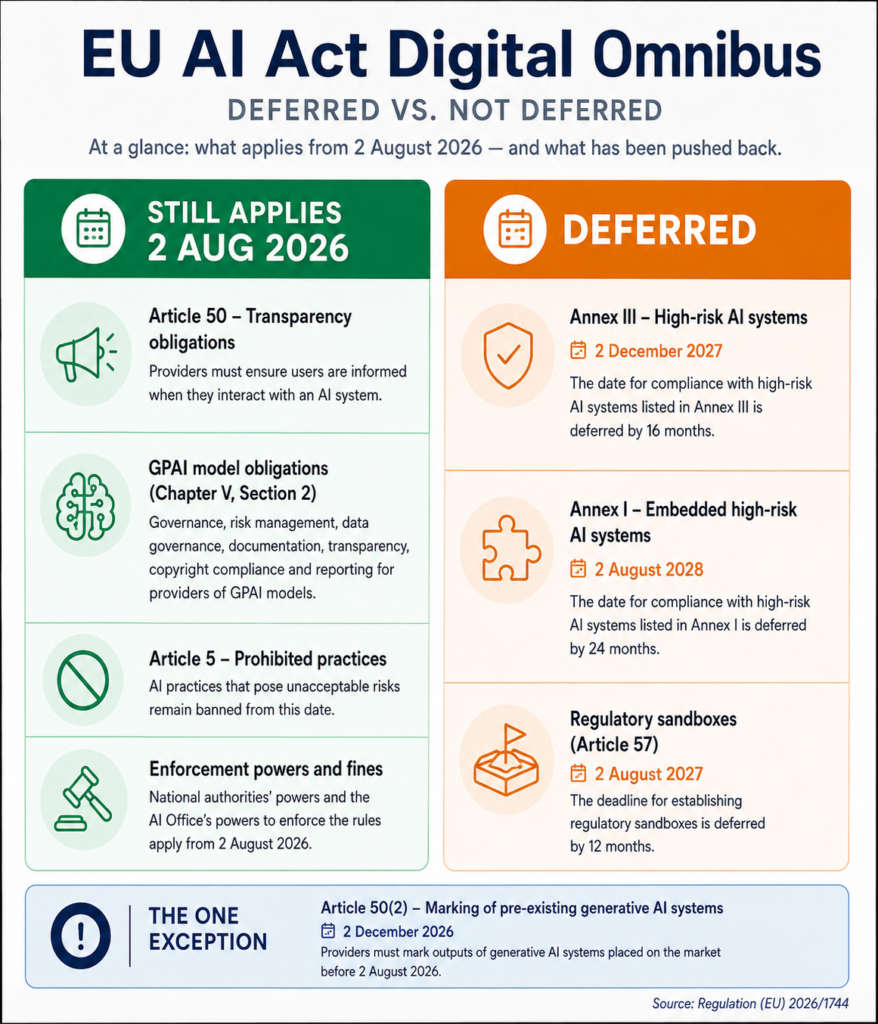
The EU AI Act Digital Omnibus became law on 27 July 2026, and most coverage of it led with a single word: delayed. That framing is causing a serious and expensive misreading. Yes, the high-risk regime moved to December 2027. However, the obligation that touches the widest range of ordinary businesses did not move at all, and it applies from 2 August 2026.
So if your board heard “the AI Act got pushed back” and quietly stood down the compliance work, this post is the correction. Below is what the EU AI Act Digital Omnibus actually deferred, what it left exactly where it was, and what a mid-market team should do in the next few days.
What the EU AI Act Digital Omnibus is
Formally, it is Regulation (EU) 2026/1744. The European Commission proposed it in November 2025 as a simplification package, negotiators reached political agreement on 7 May 2026, and the European Parliament approved it on 16 June 2026 by 423 votes to 57, with 174 abstentions. The Council gave final approval on 29 June 2026.
After signature on 8 July, publication in the Official Journal followed on 24 July 2026, and the regulation entered into force three days later on 27 July. It amends the AI Act itself, plus the Machinery Regulation and the Basic Aviation Regulation.
Crucially, the EU AI Act Digital Omnibus is a simplification package rather than a repeal. Its risk-based architecture, prohibited practices, and general-purpose AI rules survive intact. Only the calendar changed, and only in parts.
What actually got deferred
Three deadlines moved under the EU AI Act Digital Omnibus, and the reasoning was practical rather than political. The harmonised standards providers need to demonstrate conformity were never going to be ready for August 2026, so obligations that depend on them slipped.
Stand-alone high-risk systems: 2 December 2027
Annex III covers the categories most people picture when they think about AI regulation: recruitment and worker management, education, credit scoring, insurance pricing, access to essential services, critical infrastructure, and law enforcement. Those obligations, including risk management, technical documentation, human oversight, and conformity assessment, now apply from 2 December 2027. That is a 16-month deferral.
Embedded high-risk systems: 2 August 2028
AI built into products already governed by EU product safety law, such as medical devices and toys, moved from August 2027 to August 2028. Machinery is a special case, covered below.
Regulatory sandboxes: 2 August 2027
Member states now have until August 2027 to establish national AI regulatory sandboxes. Governments needed the time as much as businesses did.
What did not get deferred, and why it matters more
Here is the part the headlines buried. Article 50, which sets out transparency obligations, is not a high-risk provision. Instead, it applies as a separate layer across any AI system used in the situations it covers, regardless of risk classification. Consequently the EU AI Act Digital Omnibus left it untouched, and it applies from 2 August 2026.
Think about who that captures. A company running a customer service chatbot is in scope. A marketing team publishing AI-generated images is in scope. A recruitment firm using AI to draft outreach is in scope. None of those organisations necessarily operate a high-risk system, so none of them benefit from the December 2027 runway.
The penalties arrive on the same day
Enforcement is not deferred either. National market surveillance authorities gain the power to act on Article 50 breaches from 2 August 2026, and fines reach EUR 15 million or 3% of worldwide annual turnover, whichever is higher. The obligation and the enforcement power land together.
Also worth noting: general-purpose AI obligations and the Article 5 prohibited practices stayed on their original timelines too. Prohibited practices and the AI literacy duty have in fact applied since February 2025 already.
The four transparency duties in Article 50
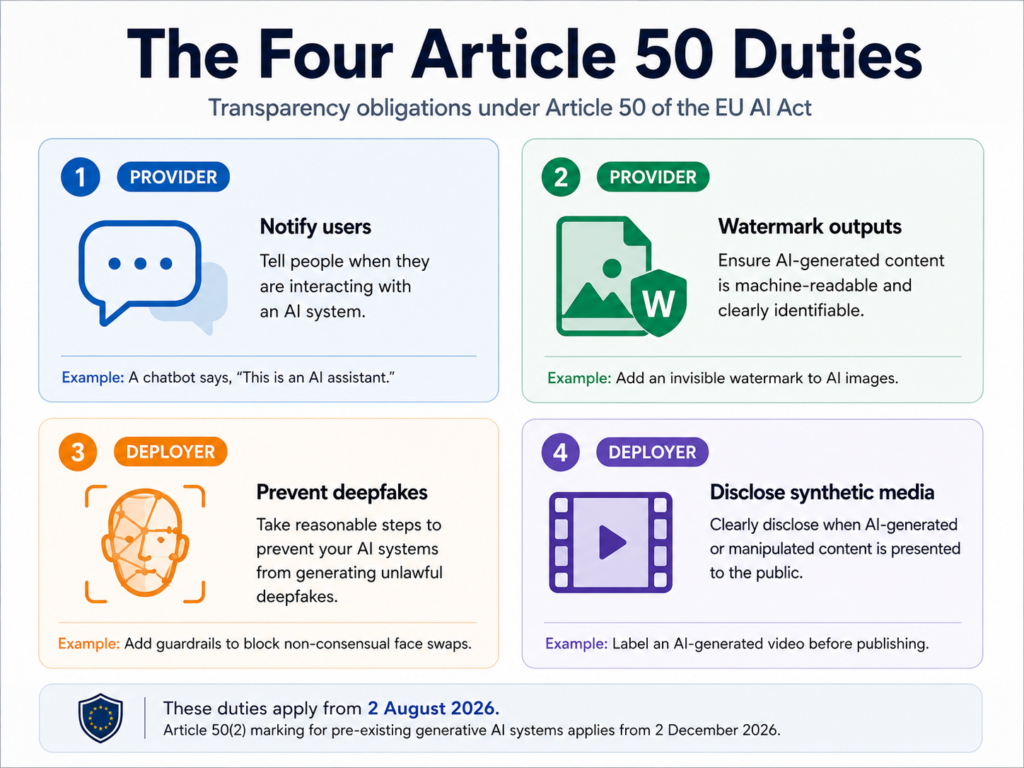
The Commission adopted guidelines on Article 50 on 20 July 2026, so the scope is now reasonably well defined. Four situations trigger obligations. Two fall on providers, and two fall on deployers.
Direct interaction (providers). People must be told they are interacting with an AI system, unless that fact is obvious to a reasonably observant person.
Synthetic content marking (providers). AI-generated image, audio, video, and text output must carry machine-readable marking that identifies it as artificially generated.
Emotion recognition and biometric categorisation (deployers). Exposed individuals must be informed that the system is operating.
Deepfakes and public-interest text (deployers). Deepfake content requires disclosure, as does AI-generated text published to inform the public on matters of public interest.
The one narrow grace period
The EU AI Act Digital Omnibus granted exactly one concession here, and it is narrower than most summaries suggest. Generative AI systems placed on the market before 2 August 2026 have until 2 December 2026 to meet the machine-readable marking requirement under Article 50(2). Content generated before 2 August 2026 does not require retroactive labelling, according to the Commission’s own guidance.
Everything else in Article 50 applies from Sunday. So the chatbot disclosure, the deepfake labelling, and the emotion recognition notice all bite immediately.
Who is outside scope
Purely personal, non-professional use falls outside these rules. Furthermore, systems performing an assistive editing function that does not substantially alter the input, such as grammar correction, are carved out, as are certain law enforcement applications. One common misconception deserves correction though: open-source AI systems are not exempt from Article 50.
Six other changes worth knowing about
1. Two new prohibitions
Article 5 now prohibits AI systems used to generate child sexual abuse material or non-consensual intimate imagery, covering both placing on the market and use. Providers of in-scope systems have until 2 December 2026 to put technical safeguards in place, including output controls and content filtering.
2. The AI literacy duty softened
Article 4 previously required organisations to ensure staff had sufficient AI literacy. Now it asks them to take measures to support it. The wording is gentler, yet the practical advice is unchanged, because documented training remains the easiest evidence to produce during any inspection.
3. The AI Office gained significant powers
Supervision previously covered general-purpose AI models and systems built on them by the same provider. Now it extends to all AI systems based on GPAI models developed within the same undertaking, plus systems that constitute or sit inside very large online platforms and search engines under the Digital Services Act. Cooperation with national authorities also gained an explicit legal basis.
4. Registration was not narrowed
Many teams assumed this one went through. The Commission had proposed exempting providers who self-assess their system as falling outside the high-risk category, but that proposal did not survive negotiations. Therefore systems self-assessed as non-high-risk must still be registered in the EU database, albeit with a lighter administrative burden.
5. A targeted machinery carve-out
AI embedded in products governed by the Machinery Regulation now falls outside the direct scope of the high-risk rules, since applying both regimes created duplication. Medical devices and toys remain fully in scope. Separately, the Commission can still impose AI-specific health and safety requirements through delegated acts under the Machinery Regulation.
6. Wider legal basis for bias testing
Processing special categories of personal data for bias detection and correction was previously limited to providers of high-risk systems. That permission now extends to providers and deployers of all AI systems. However, a strict necessity standard applies, so this is not an open door.
What to do this week
If you serve EU customers and use AI anywhere in a customer-facing process, work through these four steps before Sunday. None of them require a lawyer to start.
Inventory every customer-facing AI touchpoint. Chatbots, voice agents, AI-assisted email, generated images on your site, synthetic video, AI-written published content. List them.
Check your chatbot discloses itself. A named bot with an obvious interface may already satisfy this. An assistant that reads as human does not.
Decide your labelling standard for published synthetic media. Then write it down as policy, so the decision survives staff turnover.
Ask your vendors, in writing, how they handle Article 50 marking. If you deploy someone else’s model, their compliance gap becomes your operational problem.
Realistically, nobody expects perfect compliance by Sunday. Regulators generally look at whether an organisation was making a good-faith effort, so a documented, dated plan is worth considerably more than silence.
How to use the extra 16 months
For teams genuinely operating Annex III systems, the runway the EU AI Act Digital Omnibus created sounds generous. It is not. Building risk management processes, technical documentation, and conformity assessment evidence takes most organisations a year of real work, and the underlying obligations did not soften at all.
Start with inventory, not policy
Most organisations cannot yet answer a simple question: which AI systems do we operate, and how would each be classified? Answer that first. Afterwards, classification tells you which obligations apply and which deadline governs each system.
Next, build the documentation habit while the stakes are low. Teams that start logging model decisions, data sources, and human oversight steps now will find the 2027 conformity work mostly clerical. Teams that start in 2027 will find it frantic. If you are still deciding whether a use case is worth pursuing at all, our 12-question AI readiness assessment covers the governance dimension in more detail.
If you are based outside the EU
Territorial reach catches more companies than expected. The Act applies to providers and deployers whose AI system output is used inside the EU, whatever the company’s home jurisdiction. So a US software firm with European customers, or an Indian agency producing synthetic media for European brands, can sit squarely in scope.
Frequently asked questions
What is the EU AI Act Digital Omnibus?
The EU AI Act Digital Omnibus is Regulation (EU) 2026/1744, the first set of amendments to the EU AI Act since its adoption in 2024. It entered into force on 27 July 2026 and defers several high-risk compliance deadlines, adds two new prohibitions, expands the AI Office’s supervisory powers, and softens the AI literacy duty. It does not change the Act’s risk-based architecture.
Did the Digital Omnibus delay the whole EU AI Act?
No. The EU AI Act Digital Omnibus deferred stand-alone Annex III high-risk obligations to 2 December 2027 and embedded Annex I obligations to 2 August 2028. Article 50 transparency obligations, general-purpose AI rules, and the Article 5 prohibited practices all remain on their original timelines. Article 50 applies from 2 August 2026.
What applies from 2 August 2026?
Article 50 transparency obligations apply in full from that date, covering chatbot disclosure, synthetic content marking, emotion recognition notices, and deepfake labelling. National market surveillance authorities can enforce from the same day, with fines up to EUR 15 million or 3% of worldwide annual turnover. One narrow exception exists for machine-readable marking on generative systems already on the market, which runs to 2 December 2026.
Does my chatbot need a disclosure notice?
Probably yes, if EU users interact with it. Article 50 requires that people be informed they are dealing with an AI system unless that is obvious from the context to a reasonably well-informed person. A clearly labelled bot widget may satisfy this. An assistant presented with a human name and no indication of automation almost certainly does not.
Are open-source AI systems exempt?
Not from Article 50. Providers and deployers of AI systems released under free and open-source licences must still meet the transparency obligations where their use falls within the four covered situations. Other parts of the AI Act do contain open-source exemptions, so the position varies by provision.
Does the EU AI Act apply to companies outside Europe?
It can. The Act reaches providers and deployers whose AI system outputs are used within the EU, regardless of where the organisation is established. As a result, many US and Asian firms serving European customers fall in scope without having any EU entity.
What are the penalties for getting this wrong?
Transparency and general-purpose AI breaches sit in a tier carrying fines up to EUR 15 million or 3% of total worldwide annual turnover, whichever is higher. Prohibited practices attract higher maximums. National market surveillance authorities handle enforcement for Article 50.
Find out where you stand before Sunday
Most teams we speak to discover they have three or four AI touchpoints in scope that nobody had catalogued, usually a support chatbot, a content workflow, and something a marketing team adopted without telling IT. Finding them takes an afternoon. Explaining them to a regulator later takes considerably longer.
This article summarises publicly available information about Regulation (EU) 2026/1744 and the EU AI Act as at 31 July 2026. The Expert Community is a technology and marketing consultancy, not a law firm, and nothing here constitutes legal advice. Classification under the AI Act depends on specific facts, so please consult qualified counsel before making compliance decisions.
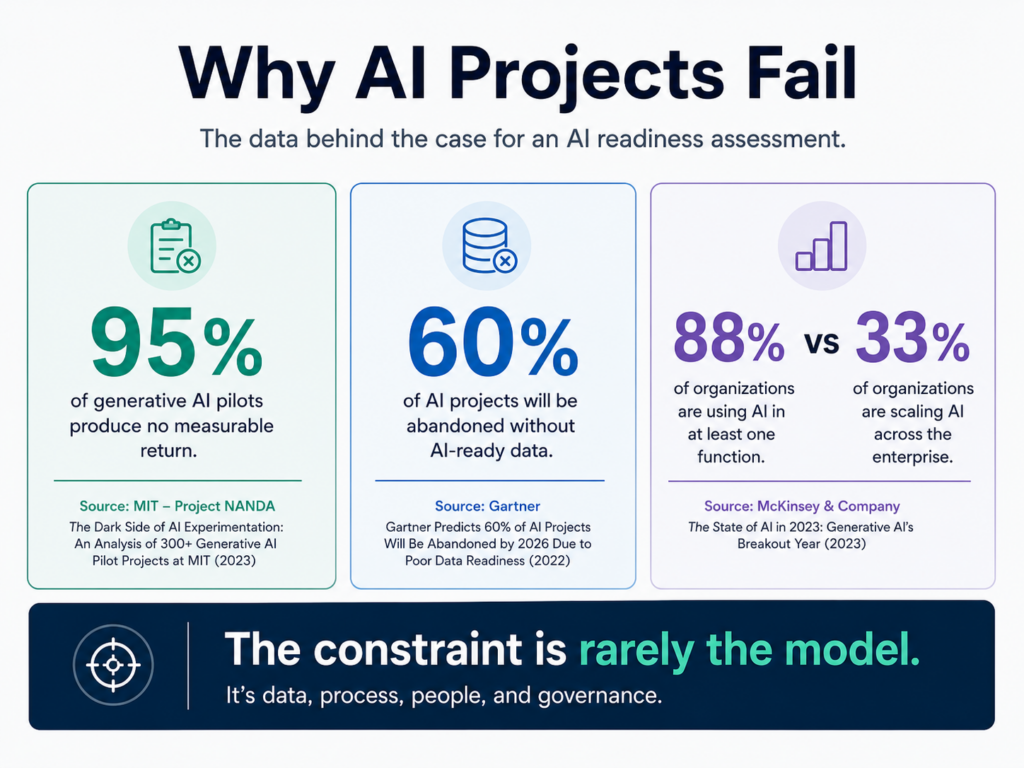
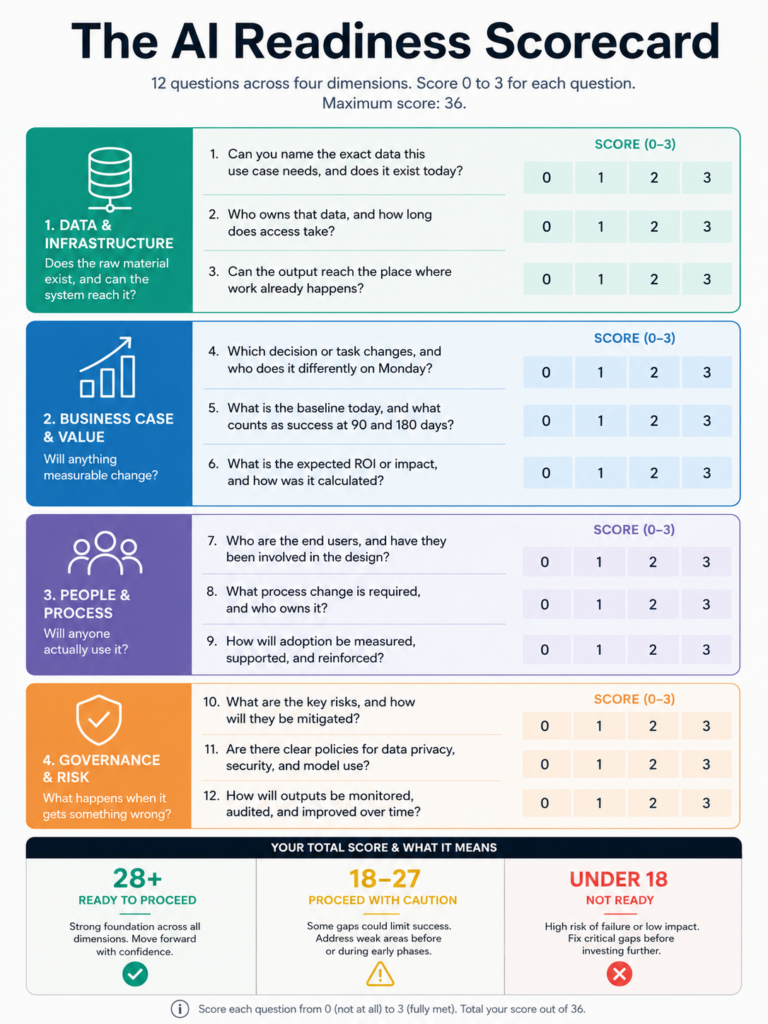
Most AI projects do not collapse because someone picked the wrong model. They collapse because nobody checked whether the business could absorb the thing before the money was committed. An AI readiness assessment catches that gap early, and it takes days rather than quarters. MIT’s Project NANDA reviewed more than 300 enterprise deployments and found that roughly 95% of generative AI pilots produced no measurable return, and the researchers traced the failures to integration and organizational habits rather than model quality.
So the question worth asking is not which vendor to sign. Instead, ask whether your organization can turn a working model into a changed workflow. Below are the twelve questions we put to clients before any build starts. Answer them honestly and you will know within a week whether to proceed, delay, or fix something else first.
Why an AI readiness assessment beats a vendor demo
Vendor demos run on clean data, a narrow use case, and someone who knows exactly which button to press. Your business runs on none of those things. That gap explains most of the disappointment that follows a signed contract.
An AI readiness assessment forces those constraints into the open while they are still cheap to fix. Run it before procurement, not after the first sprint stalls.
The four dimensions to score
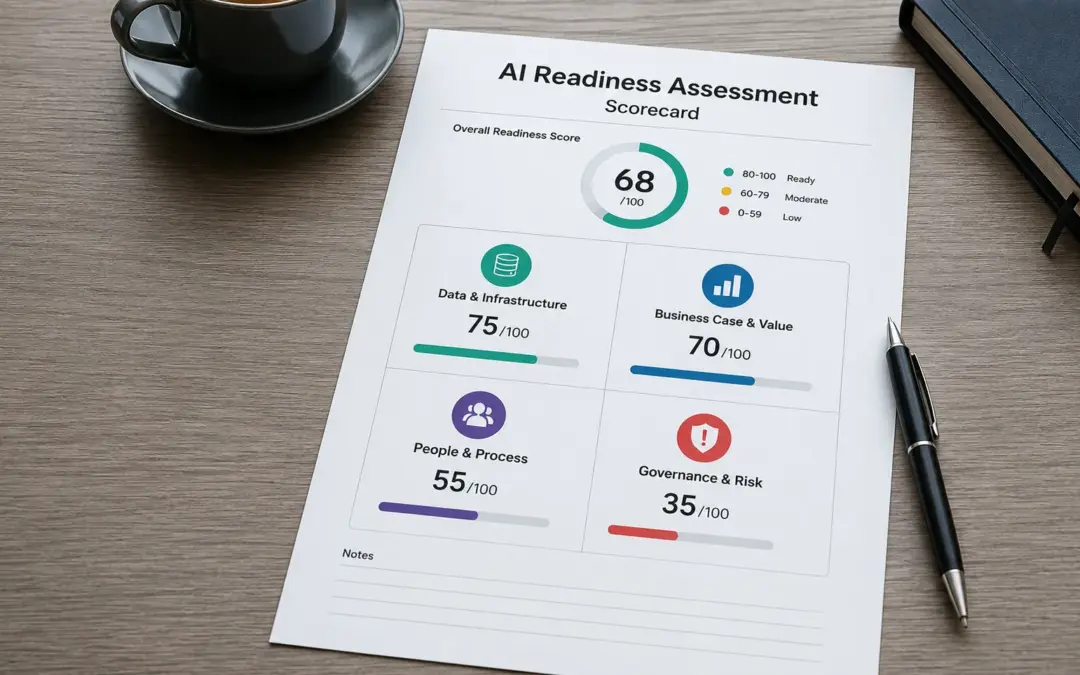
Group the twelve questions into four areas. Each one can sink a project on its own, so a strong average score hides nothing useful. Look at the weakest dimension instead.
Data and infrastructure. Does the raw material exist, and can the system reach it?
Business case and value. Will anything measurable change?
People and process. Will anyone actually use it?
Governance and risk. What happens when it gets something wrong?
Data and infrastructure: questions 1 to 3
1. Can you name the exact data this use case needs, and does it exist today?
Not “we have lots of customer data.” Name the tables, the fields, and the date range. A support automation project needs resolved ticket histories with outcomes attached, not just ticket volumes. A forecasting model needs consistent definitions of revenue across regions.
Good answer: a named list of sources with row counts and a sample someone has actually opened. Red flag: anyone who answers by describing a system rather than a dataset.
2. Who owns that data, and how long does access take?
Ownership disputes kill more timelines than engineering problems do. Because the data usually sits with a team that gains nothing from your project, access becomes a negotiation rather than a ticket. Find out now whether that negotiation takes two days or two months.
Ask specifically about production access, not sandbox exports. Teams often prove a concept on a stale CSV and then discover the live pipeline requires a security review nobody scheduled.
3. Can the output reach the place where work already happens?
An answer that lives in a separate dashboard gets checked twice and then forgotten. Therefore the integration question matters as much as the model question. If your agents work in Zendesk, the output belongs in Zendesk.
Check whether the target system has a usable API, who maintains it, and whether your IT roadmap already has three projects queued against it. If retrieval over internal documents is part of the plan, our guide to building a RAG pipeline for a business knowledge base
Business case and value: questions 4 to 6
4. Which decision or task changes, and who does it differently on Monday?
Name the role. Name the task. If you cannot describe what one specific person stops doing or starts doing, you have a technology purchase rather than a business change.
This question also exposes scope creep early. Projects described as “improving customer experience” tend to fail. Projects described as “cutting first-response time on tier-one tickets from four hours to twenty minutes” tend to ship.
5. What is the baseline today, and what counts as success at 90 and 180 days?
Measure before you build. Otherwise the review meeting turns into a debate about whether things feel better, and feelings lose budget fights. Write down the current number even if collecting it takes a week.
Set two tiers. Leading indicators show up within a fortnight, such as adoption rate or time saved per task. Lagging indicators land at 90 and 180 days, such as cost per resolution or revenue per rep. Any AI readiness assessment that skips this step leaves the CFO with nothing to approve a second phase against.
6. What is the full cost of ownership, not just the pilot?
Pilot budgets flatter everyone. Real cost includes inference at production volume, data preparation, integration work, monitoring, retraining, and the internal time nobody logs. In practice, data preparation alone consumes a large share of total effort on most projects.
Model the second year, not the first. Costs that look trivial at pilot scale often become the largest line item once volume triples.
People and process: questions 7 to 9
7. Who owns this internally, and can they change the workflow?
A sponsor without authority to redesign a process cannot deliver an AI project, however enthusiastic they are. Because adoption requires telling people to work differently, the owner needs standing with the team whose work changes.
Watch for the innovation-team trap. Projects run entirely by a central innovation function, with no operational owner, stall at handover almost every time.
8. What happens to the people currently doing this work?
Answer this before the rumour mill does. Teams that suspect a tool exists to replace them will find quiet ways to make it fail, and they will be right to protect themselves if nobody has told them otherwise.
Say plainly whether roles change, shrink, or shift toward exception handling. Honest answers survive contact with reality. Vague reassurance does not.
9. How will people learn the tool, and who supports them at week six?
Launch-day training is the easy part. Week six is when the novelty fades, the edge cases pile up, and people quietly revert to the old process. Someone needs to own that period.
Budget for three to five worked examples per role rather than a generic overview session. Teams learn faster from their own use cases, which is also why our primer on prompt engineering for non-technical teams focuses on task patterns instead of theory.
Governance and risk: questions 10 to 12
10. What is the worst realistic failure, and what does it cost?
Every model gets things wrong. So the useful question is what happens downstream when it does. A wrong product recommendation costs a click. A wrong eligibility decision costs a lawsuit.
Map failure cost to oversight design. Low-stakes outputs can run unsupervised. High-stakes outputs need a human checkpoint, and McKinsey found that high performers are far more likely to have defined human-in-the-loop validation than everyone else. Notably, nearly two-thirds of respondents named security and risk as the top barrier to scaling agentic AI, ahead of regulation or technical limits.
11. Where does your data go, and who else can see it?
Trace the path. Which provider processes the request, in which region, under what retention terms, and does anything get used for training? Procurement often assumes answers that the contract does not actually give.
Also check the tools your staff already use without approval. Shadow usage is widespread, and an AI readiness assessment that ignores it measures the wrong organisation.
12. Which regulations apply, and on what timeline?
That extra runway is not a reason to stop. Rather, use it to build the documentation trail now, while the work is cheap. The NIST AI Risk Management Framework gives you a free, sector-agnostic structure built around four functions: govern, map, measure, and manage. Most mid-market teams can adopt a light version of it without hiring a compliance function.
How to score your AI readiness assessment
Score each question from 0 to 3. Zero means nobody knows. One means someone has an opinion. Two means it is documented. Three means it is documented and tested.
Then read the result by dimension rather than by total, because the lowest dimension sets your actual ceiling.
28 to 36: proceed. Build the narrowest useful version and measure it.
18 to 27: proceed carefully, with a fixed remediation list running alongside the build.
Below 18: stop and fix foundations first. Spending now buys a pilot you cannot scale.
Any single dimension under 5: treat it as a blocker regardless of the total.
Run the AI readiness assessment with the operational team in the room, not just leadership. The gap between what executives believe and what the people doing the work know is usually where the real answer sits.
What to do when the score comes back low
A low score is useful information, not a verdict. Most organizations that score badly on their first AI readiness assessment score well within a quarter, because the fixes are unglamorous and well understood.
Fix in this order
Start with data access, since everything else waits on it. Next, name an operational owner with authority. After that, write the baseline metrics down. Finally, pick a smaller use case than the one you started with.
Shrinking scope is the single most reliable move. A narrow workflow with clean data and a named owner beats an ambitious programme with none of those things, every time. Once the first one works, the second is far easier to fund. Our overview of agentic AI for business leaders covers where those first workflows usually pay off.
Repeat it quarterly
Readiness moves. New systems land, people leave, and regulation shifts. Therefore treat the AI readiness assessment as a recurring check rather than a gate you pass once. Quarterly works well for most mid-market teams.
Run yours before the next budget cycle
Twelve questions, honestly answered, will tell you more about your odds than any vendor evaluation. If you would rather have someone outside the org ask them, we run structured AI readiness assessments for mid-market teams across the US and Europe, and you get a scored report with a prioritised fix list at the end of it.
An AI readiness assessment is a structured review of whether an organisation can successfully deploy and sustain an AI system, covering data availability, business case, people and process, and governance. It happens before investment, and it produces a score plus a remediation list rather than a technology recommendation.
How long does an AI readiness assessment take?
For a single use case, two to three weeks is typical: about a week of interviews, a week of data verification, and a few days to score and write up findings. Assessments covering an entire organisation take four to six weeks, mostly because more stakeholders need scheduling.
Who should be involved?
Include the executive sponsor, the operational manager whose team’s work changes, someone who owns the relevant data, an IT or engineering representative, and whoever handles legal or compliance. Leaving out the operational manager is the most common mistake, because that is where the honest answers live.
Can we run an AI readiness assessment internally?
Yes, and many teams do. The main limitation is candour, since internal reviewers rarely tell a sponsor that their favourite project is not viable. If the investment is significant or politically sensitive, an outside reviewer usually surfaces more.
What score means we are ready?
Using the 0 to 3 scale across twelve questions, 28 or above supports proceeding. Between 18 and 27, proceed with a documented remediation plan. Below 18, fix foundations first. Also treat any single dimension scoring under 5 as a blocker, whatever the total says.
Does the EU AI Act apply to us if we are based outside Europe?
It can. The Act reaches providers and deployers whose AI system outputs are used in the EU, regardless of where the company sits. Consequently, US firms serving European customers frequently fall in scope. Confirm your classification with counsel, because obligations differ sharply between limited-risk and high-risk categories.
How often should we repeat the assessment?
Quarterly for active programmes, or whenever something material changes such as a new data platform, a reorganisation, or a regulatory update. Readiness is a moving target, so a single annual review tends to miss the changes that matter most.
Your AI has a knowledge problem.It knows a lot about the world up to its training date. However, it knows nothing about your company, your products, your internal processes, your most recent data, or the specific context your team works in every day. So when employees ask it a question about company policy, a customer asks it about your product specs, or a sales rep wants a summary of last quarter’s account notes, the AI does one of two things. It gives a confident, generic answer. Or worse, it makes one up.
This problem has a name: hallucination. And it has a fix: RAG, which stands for Retrieval-Augmented Generation.
McKinsey’s State of AI 2025 reports that 78% of organizations now use AI in at least one business function, and 71% of those organizations ground their AI models using RAG. It has become the reference architecture for any production-grade AI system that needs to work with real, current, business-specific information.
This guide explains what a RAG pipeline is, how it works at each stage, and how your business can build one, even without a dedicated data science team.
What Is a RAG Pipeline and Why Does Your Business Need One?
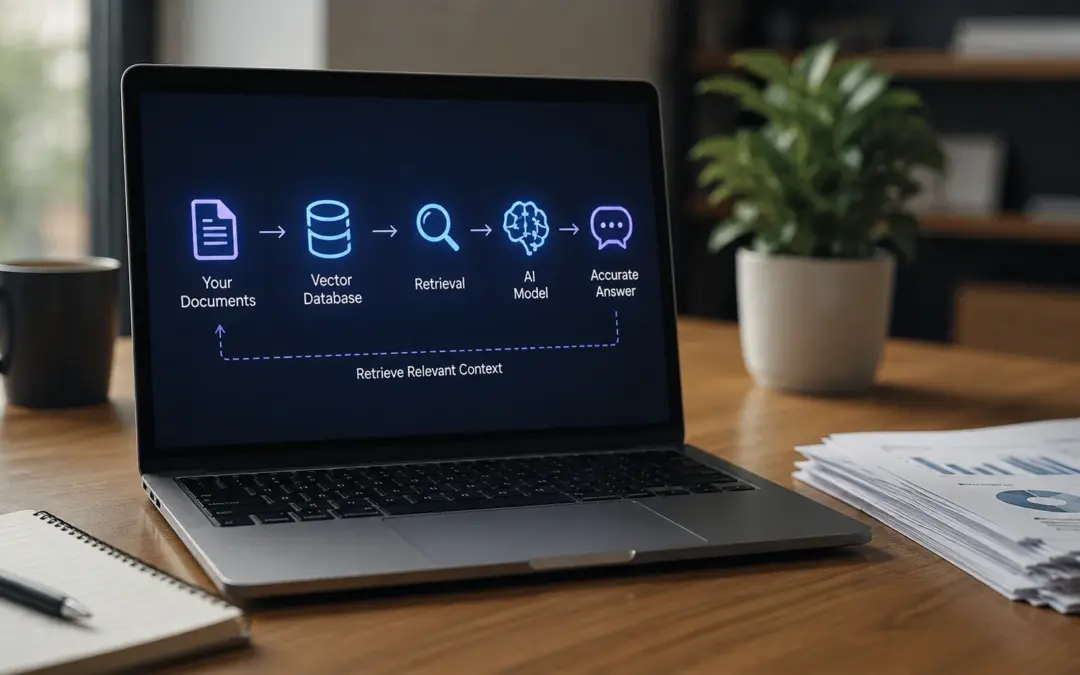
A RAG pipeline is a system that connects an AI language model to your own documents and data at the moment it answers a question. Instead of relying on its training data alone, the AI retrieves relevant information from your knowledge base first, then generates an answer grounded in what it just found.
Think of it this way. A standard AI model is like a very smart employee who read everything published on the internet up to a certain date but has never seen a single internal document from your company. A RAG-powered AI is like that same employee, except now they can instantly search your entire document library, find the most relevant pages, and base their answer on what they find there.
Why Hallucination Is a Business Problem, Not Just a Technical One
When a user submits a question to a RAG-powered system, three things happen in sequence. First, the system converts the question into a mathematical representation and searches your knowledge base for the most semantically relevant documents. Second, it pulls the best matching content into the model’s context. Third, the model generates an answer based on what it just retrieved, rather than what it was trained on months or years ago.
The result is an AI that can answer questions about your specific business, cite the source it used, and stay current as your documents change, without requiring expensive model retraining.
RAG vs Fine-Tuning: Why Most Businesses Choose RAG
RAG and fine-tuning are both methods for making an AI model more useful for a specific domain. However, they solve different problems, at very different costs. For most business use cases, RAG is the right choice — and understanding why will save you months of wasted effort.
Fine-tuning means retraining a model on your data to bake knowledge into its weights permanently. It is expensive, slow, and produces a model that goes stale the moment your knowledge base changes, requiring another expensive retraining cycle.
RAG, by contrast, keeps knowledge separate from the model entirely. Because RAG separates knowledge from model weights, knowledge base updates never require model retraining. You add a document to your knowledge base, and the system can use it immediately at the next query.
When Each Approach Makes Sense
Fine-tuning makes sense when you need the model to behave differently, adopting a specific writing style, following a particular reasoning pattern, or producing structured outputs in a proprietary format. It changes how the model thinks and speaks.
For most businesses deploying AI on internal knowledge, customer data, or operational documents, RAG is the right architecture. Fine-tuning is the layer you add later, if at all.
The IDEA Pipeline: A Business Framework for RAG
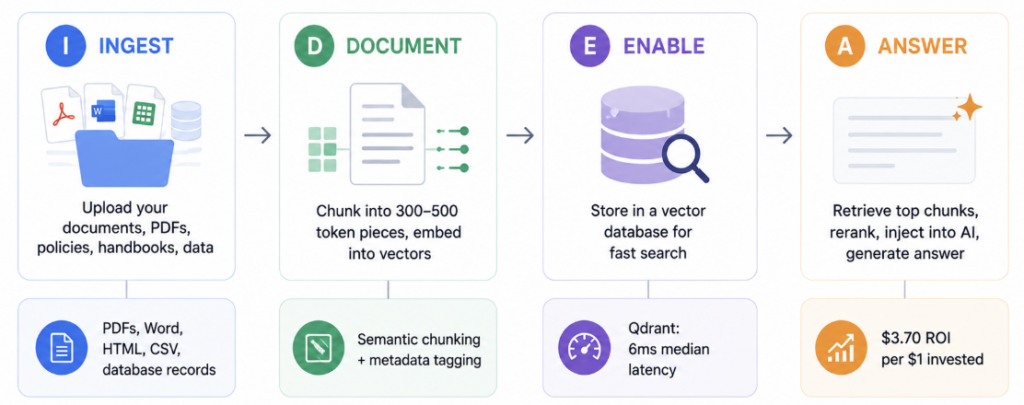
The IDEA Pipeline is a four-stage framework for building a RAG system on your business knowledge base. Each stage maps to a concrete technical component, but each one also has a clear business decision at its core.
I — Ingest → What knowledge does your AI need access to? D — Document → How do you prepare and index that knowledge? E — Enable → Where and how do you store it for fast retrieval? A — Answer → How does the AI retrieve, rank, and generate responses?
The reason most business RAG projects fail is not technical. It is that teams skip the first stage, dump unstructured data into a pipeline, and wonder why the outputs are unreliable. The IDEA framework forces you to start with the knowledge question before touching the infrastructure question.
Step 1: Ingest — Building Your Knowledge Base
The first stage of a RAG pipeline is deciding what knowledge your AI should have access to, and then ingesting it into a form the pipeline can process. The quality of your RAG output is entirely determined by the quality of what you put in.
Start by identifying the documents that answer the questions your users actually ask. For most businesses, the highest-value sources fall into a few categories. Internal policy and procedure documents, including HR handbooks, compliance guides, and operational SOPs, are typically the first layer. Product documentation, including specifications, FAQs, pricing sheets, and release notes, forms the second. Customer-facing knowledge, including support tickets, case studies, and onboarding materials, forms the third.
Resist the temptation to ingest everything. A tightly curated knowledge base of 500 high-quality documents consistently outperforms a sprawling corpus of 50,000 poorly governed ones.
What Document Formats RAG Supports
Modern RAG frameworks handle most common document formats natively. PDFs, Word documents, HTML pages, Markdown files, plain text, CSV files, and structured database records can all feed into a pipeline using document parsers like Apache Tika or Unstructured.io. The ingestion stage converts raw files into clean text that the subsequent stages can process.
Governance: The Step Most Teams Skip
Every document in your knowledge base needs ownership. Someone must be responsible for keeping it current, flagging it for removal when it becomes outdated, and tagging it with the metadata that retrieval systems use to filter results accurately. Without governance, your knowledge base becomes unreliable within months, not years.
Step 2: Document — Chunking and Embedding Your Content
The second stage converts your cleaned documents into a form that retrieval systems can search semantically. This involves two processes: chunking, which breaks documents into retrievable pieces, and embedding, which converts those pieces into numerical representations that capture meaning.
The chunking strategy matters more than most teams expect. Chunks that are too small lose context. Chunks that are too large dilute relevance. Semantic chunking, which splits on meaning rather than character count, consistently outperforms fixed-size approaches for business knowledge bases.
What Embedding Models Do
Once documents are chunked, an embedding model converts each chunk into a vector, a list of numbers that represents the semantic meaning of that text. Similar ideas produce vectors that are close together in mathematical space. When a user asks a question, the pipeline embeds the question using the same model, then searches for chunks whose vectors are closest to the question’s vector.
A vector database stores your document embeddings and enables fast similarity search at query time. It is the retrieval engine at the heart of your RAG pipeline. Choosing the right one depends on your scale, budget, and data privacy requirements.
The main options each suit different situations. Pinecone is fully managed, requires no infrastructure overhead, and suits teams that want to move fast without owning the infrastructure. Qdrant is open-source, self-hostable, and delivers exceptional performance for organizations with data sensitivity requirements or high query volumes. Weaviate handles both vector and traditional keyword search natively and suits knowledge bases with mixed structured and unstructured content. ChromaDB is lightweight, developer-friendly, and ideal for prototyping or smaller-scale deployments before committing to production infrastructure.
If you configure only one thing beyond a basic vector store, make it hybrid search. For most business knowledge bases, it delivers meaningfully better retrieval accuracy than either approach alone.
Step 4: Answer — Retrieval, Reranking, and Generation
The final stage is what users experience directly. When a query arrives, the pipeline retrieves the most relevant chunks, reranks them by relevance score, injects them into the model’s context, and generates a grounded response. The quality of this stage determines whether users trust the system.
Retrieval and Reranking
At query time, the pipeline searches the vector database for the top matching chunks, typically the top 5 to 20, depending on the model’s context window. However, raw vector similarity does not always produce the best ordering. Reranking models, such as Cohere’s rerank-v3, take the initial retrieval results and rescore them based on a deeper relevance assessment before they reach the generation model.
The retrieved chunks, combined with the original query, pass into the language model as context. The model generates a response grounded in what it just retrieved, not in its training data. Well-configured RAG systems also surface citations, telling the user which document the answer came from, which is essential for compliance-sensitive use cases like legal, finance, and healthcare.
For businesses building RAG in 2026, starting with a standard pipeline and planning for an agentic upgrade is the right sequencing. The foundational architecture is the same. Agentic RAG adds an orchestration layer on top.
The 5 Highest-ROI Use Cases for Business RAG in 2026
Employees spend a significant portion of their working week searching for information that already exists inside the organization. A RAG-powered internal assistant, connected to policy documents, HR handbooks, project notes, and operational procedures, reduces that friction to seconds per query. New employee onboarding time falls. Support escalations fall. Decision-making accelerates.
Sales teams carry an enormous amount of institutional knowledge in their heads, knowledge that leaves with them when they move on. RAG pipelines connected to CRM notes, proposal libraries, competitive intelligence, and product specifications give every sales rep access to the best answers from your best performers, on demand.
5. Business Intelligence and Reporting
RAG can connect to structured data sources, transforming financial models, spreadsheets, and BI dashboards into queryable knowledge. Instead of waiting for an analyst to run a query, a business leader asks a question in natural language and receives a grounded, sourced answer in seconds.
Common Mistakes That Kill RAG Projects
Mistake 1: Skipping Data Governance
The single most common reason enterprise RAG projects fail is ungoverned data. Teams ingest everything, including outdated documents, duplicated files, and conflicting sources, and then wonder why the AI gives inconsistent answers. Curate before you ingest. Assign document owners. Set an update cadence.
Mistake 2: Not Evaluating Retrieval Quality Separately From Answer Quality
These are two distinct failure points. A RAG system can retrieve the right documents and still generate a poor answer. Alternatively, it can generate a fluent answer from the wrong documents. Both need monitoring, and they need separate metrics. Retrieval quality measures whether the right chunks come back. Answer quality measures whether the response is accurate and grounded.
Mistake 3: Ignoring Chunk Size and Metadata
Fixed-size chunking applied uniformly across all document types consistently underperforms semantic chunking. Additionally, chunks without metadata, specifically source, date, and topic tags, cannot be filtered during retrieval. The model therefore retrieves chunks without any ability to prioritize recent content over stale content, or internal policy over general reference material.
How to Build a RAG Pipeline Without a Data Science Team
Modern RAG platforms have reduced the technical barrier significantly. Non-technical teams can deploy functional RAG systems using no-code and low-code tools, while technical teams can use open-source frameworks to build production-grade pipelines. The right starting point depends on your scale and requirements.
No-Code and Low-Code Options
Several platforms now offer RAG-as-a-service with document upload, automatic chunking and embedding, and a chat interface, all configurable without writing a line of code. The leading options include Notion AI for teams already living in Notion, Microsoft Copilot for organizations in the Microsoft 365 ecosystem, expert and Confluence AI for existing knowledge base users, and ChatGPT Enterprise with file upload for quick prototyping.
These tools abstract away the infrastructure entirely. The tradeoff is less control over chunking strategy, embedding models, and retrieval tuning, which matters more as your use case becomes more complex.
Both frameworks support the major vector databases, the leading embedding models, and a growing ecosystem of evaluation and monitoring tools. LlamaIndex tends to be preferred for document-heavy knowledge base use cases. LangChain tends to be preferred for agent-based and multi-chain workflows.
The Recommended Starting Path
Start with a managed platform and a single, high-value use case. Prove the ROI. Then graduate to an open-source framework when your volume, accuracy requirements, or data privacy needs outgrow the managed solution. Almost every successful enterprise RAG deployment followed this sequence.
Your AI is only as useful as the knowledge you give it.
Most businesses deploy AI on top of their existing data and get mediocre results. The reason is almost never the AI model. It is the absence of a structured, governed knowledge pipeline connecting the model to the right information at the right time.
We help businesses design and implement RAG pipelines that connect their AI to the knowledge that actually drives decisions, customer answers, and operational efficiency.
A RAG pipeline is a system that connects an AI language model to your own documents and data. When someone asks the AI a question, it first searches your knowledge base for the most relevant information, then generates an answer based on what it finds. This grounds the response in your actual business data rather than in the model’s general training, which reduces hallucination and keeps answers current without requiring model retraining.
How is RAG different from just uploading files to ChatGPT?
Uploading files to ChatGPT is a simple, session-specific version of retrieval. A proper RAG pipeline is a persistent, scalable architecture. It stores embeddings permanently in a vector database, supports thousands of documents, enables filtering by metadata, applies reranking for accuracy, and integrates into your existing applications via API. File upload works for ad-hoc queries. A RAG pipeline works for production workflows with many users and ongoing knowledge updates.
Do you need to know how to code to build a RAG pipeline?
Not necessarily. No-code platforms like Microsoft Copilot, Notion AI, and ChatGPT Enterprise allow teams to build functional RAG systems without writing code. For more control over accuracy, data privacy, or integration with existing systems, open-source frameworks like LangChain and LlamaIndex require engineering resources. The right choice depends on your scale, budget, and technical requirements.
What is the difference between RAG and fine-tuning?
Fine-tuning changes how a model thinks and speaks by retraining it on your data. RAG changes what a model knows by connecting it to an external knowledge base at query time. Fine-tuning is expensive, produces a static result that goes stale, and is best for changing model behavior. RAG is cost-effective, stays current as documents change, and is best for giving the model access to your specific knowledge. Most business use cases call for RAG, not fine-tuning.
How much does it cost to build a RAG pipeline?
Costs range widely. No-code platforms typically cost between $20 and $100 per user per month with no infrastructure overhead. Open-source deployments incur embedding costs (OpenAI’s text-embedding-3-small costs $0.02 per million tokens), vector database hosting (Pinecone’s starter tier is free, production tiers start around $70 per month), and engineering time to build and maintain the pipeline. Most small-to-mid-size business deployments come in under $500 per month in infrastructure costs once built.
What types of documents can a RAG pipeline use?
Modern RAG pipelines handle virtually any document format, including PDFs, Word documents, PowerPoint files, Excel spreadsheets, HTML pages, Markdown files, plain text, CSV data, and structured database records. Parsing tools like Apache Tika and Unstructured.io convert these into clean text that the pipeline can chunk and embed. The main constraint is not file format but data quality: clean, current, well-governed documents produce far better retrieval results than unstructured dumps of mixed-quality files.
How long does it take to build and deploy a RAG pipeline?
A no-code prototype can be running in a day. A production-grade open-source pipeline typically takes two to six weeks, depending on the complexity of your knowledge base, the number of document sources, and the integration requirements with existing systems. The longest phase is usually data preparation, specifically cleaning, tagging, and governing your knowledge base before ingestion, which often takes as long as the technical build itself.
Here is what is happening to your organic traffic right now, whether you know it or not.
Someone searches for a problem your business solves. An AI — ChatGPT, Perplexity, Google’s AI Overview — pulls together an answer. It names a few companies as sources. It cites a few URLs. The user reads the summary, gets what they came for, and leaves.
Your website was never visited. Your #1 ranking never helped you. And your competitor, who optimized for AI search six months ago, just got a citation that will compound every single day.
The question is not whether to optimize for AI search. It is whether you do it before your competitors do.
This guide gives you the exact playbook.
Why Traditional SEO Is No Longer Enough
Here is what is happening to your organic traffic right now, whether you know it or not.
Someone searches for a problem your business solves. An AI tool, whether ChatGPT, Perplexity, or Google’s AI Overview, pulls together an answer. It names a few companies as sources. It cites a few URLs. The user reads the summary, gets what they came for, and leaves. Your website never saw them. Your number-one ranking never helped you. Meanwhile, your competitor, who optimized for AI search six months ago, collected a citation that compounds every single day.
The pages earning AI citations are not necessarily the ones with the most backlinks. Instead, they are the ones written clearly enough for an AI to extract a trustworthy answer, attributed to a credible source, and structured in a way that makes the AI’s job easy. That is a different optimization problem, and it has a name: Generative Engine Optimization (GEO).
ChatGPT, Perplexity, and Google AI Overviews each select citation sources differently. Understanding the selection logic of each platform, therefore, is the foundation of any AI-powered SEO strategy. They share common preferences, including structured content, authoritative sources, and direct answers. However, they do not cite the same pages.
Perplexity operates as a citation-first search engine. It attributes every claim to a specific source, which makes it both more transparent and more demanding about source quality. It generates an estimated 780 million monthly queries and serves as the default research tool for professionals, developers, and analysts. Specifically, Perplexity favors pages with clear structure, factual accuracy, and accessibility to its crawler. Earned media, including third-party mentions, authoritative publications, and domain credibility, carries the most weight on this platform.
The VASE Method: 4 Pillars of AI Search Visibility
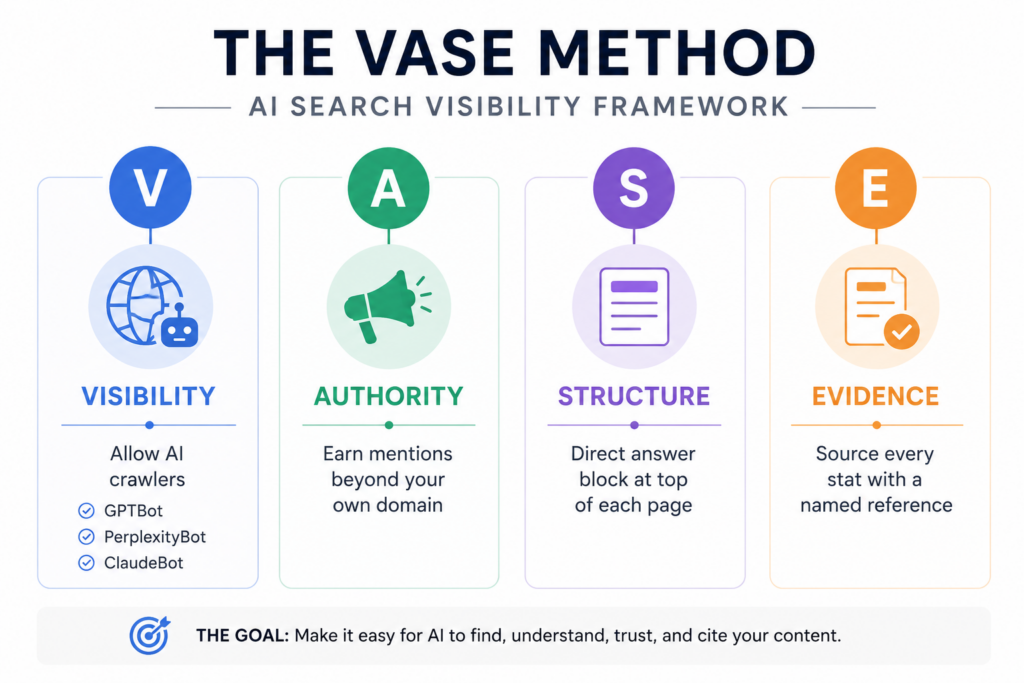
The VASE Method is a four-pillar framework for building AI search visibility across ChatGPT, Perplexity, and Google AI Overviews simultaneously. Each pillar targets a different factor that AI platforms use to select and cite sources.
V — Visibility → Is your content accessible to AI crawlers? A — Authority → Does the broader web treat you as a trusted source? S — Structure → Can an AI extract a direct, clean answer from your page? E — Evidence → Does your content back claims with sources and data?
You do not need to perfect all four at once. Most businesses already have one or two pillars in reasonable shape. The gap, however, is usually in Structure and Evidence, the two pillars that most directly influence whether an AI can extract and cite your content.
V — Visibility (Technical Access)
Your content is worthless to an AI if its crawler cannot read your pages. Visibility means allowing GPTBot (ChatGPT), PerplexityBot, Claudebot, and GoogleBot in your robots.txt, all four, explicitly. It also means avoiding JavaScript-only rendering for key content, maintaining a clean sitemap.xml, fast load times, and no crawl blocks on your most important pages.
A — Authority (Third-Party Signals)
AI platforms do not just read your website. They read the whole web. The brands that get cited most frequently by ChatGPT and Perplexity are brands with a strong footprint beyond their own domain — mentions in industry publications, Reddit threads, Wikipedia references, podcasts, and Q&A platforms. 90% of AI citations driving brand visibility originate from earned and owned media, not paid placements. You cannot buy your way into AI citations. You earn them.
S — Structure (Content Format)
This is the highest-leverage pillar for most businesses. Pages with well-organised headings are 2.8× more likely to earn citations in AI search results. Direct answer blocks at the start of each section — a 40–60 word answer to the exact question the heading asks — are the single most impactful formatting change you can make today. Tables, bullet lists, numbered steps, and FAQ blocks all signal to AI systems that your content is structured for extraction.
To appear in ChatGPT Search results, prioritise domain reputation, content readability, brand mentions across the web, and explicit access for GPTBot. ChatGPT cites pages that directly answer the query — it does not need you to rank highly on Google first.
Here is what moves the needle specifically for ChatGPT:
Allow GPTBot in your robots.txt
This is the first thing to check. If your robots.txt blocks OpenAI’s crawler, ChatGPT cannot access your pages. Add this if it is missing:
User-agent: GPTBot Allow: /
Write with a direct answer in the first paragraph
ChatGPT Search is looking for pages that answer the user’s question immediately. Before any background, context, or explanation — put a 40–60 word direct answer to the question the page is targeting. This is what gets extracted into the AI answer.
ChatGPT surfaces FAQ-structured content readily. Add FAQ schema to your service pages, blog posts, and landing pages. Every FAQ answer should be a direct, self-contained response to the question — not a teaser that requires clicking through.
Optimizing Specifically for Perplexity
Perplexity prioritises citation quality, factual accuracy, and direct source attribution. To appear in Perplexity results, make your content crawlable, source every claim, and earn third-party mentions from credible domains in your industry.
Perplexity’s citation logic is the most transparent of the major AI search platforms — it shows users exactly where each answer came from. That transparency means its selection criteria are also more observable.
Allow PerplexityBot explicitly
User-agent: PerplexityBot Allow: /
Source every factual claim Perplexity values content that mirrors the citation standards of journalism or academic writing. When you make a data claim, link to the primary source. When you reference a study, name it. When you quote a statistic, attribute it. Unsourced claims are a credibility signal against you.
Target comparison and listicle formatsComparison and listicle formats represent 25.37% of all AI citations across major platforms including Perplexity. “X vs Y” posts, “Best tools for [task]” roundups, and “How to [do X] in [number] steps” guides are the formats Perplexity pulls from most.
Earn mentions on community platforms Perplexity frequently surfaces content from Reddit, Quora, and Wikipedia. Building a brand presence on these platforms — answering questions in your niche, contributing useful responses, maintaining a Wikipedia entry if your company qualifies — directly feeds Perplexity citation likelihood.
Optimizing for Google AI Overviews
Google AI Overviews pull primarily from pages that already rank in the top 10 organically, but traditional rankings alone are not enough. Pages cited in AI Overviews earn 35% more organic clicks and 91% more paid clicks than non-cited pages — making citation the new position zero.
Apply Article + FAQPage schema on every blog postSchema-rich pages are strongly favoured by Google AI Overviews. Apply Article schema to all editorial content. Add FAQPage schema to any page that answers questions. These are the two schemas with the most direct impact on AI Overview citation rates.
Strengthen your E-E-A-T signals Author bios, publication dates, “last updated” markers, and clear expertise signals all feed Google’s E-E-A-T (Experience, Expertise, Authoritativeness, Trustworthiness) scoring. Google uses E-E-A-T heavily when deciding which sources to cite in AI-generated answers.
Target featured snippet formats The content formats that historically won featured snippets — direct definitions, step-by-step numbered lists, concise tables — are the same formats Google AI Overviews pull from. If you are already optimising for featured snippets, you are most of the way to AI Overview optimisation.
Update content regularly Stale content loses AI Overview citations. The 70% citation churn rate over 2–3 months means that regularly updated, freshly sourced content has a material advantage over static pages.
Technical Setup: Making Your Site AI-Crawlable
AI search visibility starts with technical access. If AI crawlers cannot read your pages, no amount of content quality will get you cited. Here is the complete technical checklist.
robots.txt allow all major AI crawlers:
User-agent: GPTBot Allow: /
User-agent: PerplexityBot Allow: /
User-agent: ClaudeBot Allow: /
User-agent: Bingbot Allow: /
User-agent: Googlebot Allow: /
Schema markup — minimum viable setup:
Article or BlogPosting on all editorial content
FAQPage on any page with Q&A content
Organization on your homepage
BreadcrumbList for site navigation structure
Content rendering:
Ensure critical page content is in HTML, not JavaScript-rendered
AI crawlers vary in JavaScript execution capability — do not put key copy or headings inside dynamic JS components
Page speed:
Target Core Web Vitals pass — slow pages are deprioritised by both Google and AI crawlers
Use a CDN for global content delivery
llms.txt (optional but low-effort): A plain-text file at yoursite.com/llms.txt that describes your site’s purpose and primary content categories. No major AI provider has confirmed it as a ranking signal, but it takes 30 minutes to set up and is reasonable insurance.
How to Track Your AI Search Visibility
You cannot improve what you cannot measure. AI search visibility requires different tracking methods than traditional SEO — Google Search Console does not show you ChatGPT citations.
Manual audit (free, start here): Query your 10–20 most important commercial questions across ChatGPT, Perplexity, Gemini, and Google AI Mode. Note: Is your brand named? Is your domain cited? What competitors are cited instead? Do this monthly and document changes. This costs nothing and reveals more than any paid tool at the start.
Search Console for AI Overviews: Google added dedicated AI search tracking to Search Console in mid-2025. Go to Performance → Search Results → Filter → Search Appearance → AI Mode. This shows you which queries surfaced your content inside Google’s AI-generated responses.
Paid tools for scale:
Semrush AI Toolkit — tracks visibility across ChatGPT, Google AI Mode, and Perplexity
Ahrefs Brand Radar — monitors brand mentions in AI Overviews and generative results
Otterly.ai — monitors brand mentions across multiple AI platforms with citation alerts
SE Ranking — tracks citations in ChatGPT and Perplexity responses by target keyword
GA4 — tag your AI referral traffic: In GA4, create a custom channel grouping for AI referral traffic. Tag sessions from chat.openai.com, perplexity.ai, gemini.google.com, and bing.com/chat as a unified AI channel. This lets you measure AI-referred sessions, conversion rate, and revenue contribution separately from traditional organic.
The 30-Day AI SEO Action Plan
You do not need six months to see results from this. Here is a sequenced 30-day plan that prioritises highest-impact actions first.
Week 1 — Audit and Access
Run a manual citation audit: query your top 20 commercial questions across ChatGPT, Perplexity, Gemini, and Google AI Mode. Document who is cited. Note where you appear and where competitors appear instead.
Check and update robots.txt to allow all four AI crawlers explicitly.
Set up GA4 AI referral channel grouping.
Set up Search Console AI Mode filter.
Week 2 — Structure Your Top 10 Pages
Identify your 10 highest-traffic or highest-value pages.
Add a 40–60 word direct answer block at the top of each page — before any introduction or context.
Add or update H2 headings to be question-formatted where relevant.
Apply Article and FAQPage schema to blog posts and informational pages.
Week 3 — Authority Building
Identify 5 relevant Reddit communities or Quora topics in your niche. Answer 2–3 questions per platform per week with substantive responses that include your brand name and URL where appropriate.
Reach out to 3 industry publications for guest contribution or data-sharing opportunities.
Audit your Wikipedia presence — does your company or any key topics you own have a Wikipedia page? If yes, ensure accuracy. If your company qualifies, consider creating one.
Week 4 — Content and Measurement
Publish one comparison piece (“X vs Y: Which is better for [use case]?”) — this format outperforms across all AI citation platforms.
Publish one data-led piece with original statistics or compiled research — cited data is one of the strongest GEO signals.
Rerun your manual citation audit from Week 1 and compare. Note any changes.
Review GA4 AI referral traffic. Set a monthly baseline.
Ready to Show Up Where Your Buyers Are Searching?
Your competitors are already building AI citation footprints. The businesses that start now hold a compounding advantage that becomes very difficult to close after 12 months.
If you want a full AI visibility audit for your site, a custom GEO strategy, or hands-on training for your content team, let’s talk. We will show you exactly where you appear and where you do not across ChatGPT, Perplexity, and Google AI Overviews, and what it takes to change that.
frequently Asked Questions
What is AI-powered SEO and how is it different from traditional SEO?
AI-powered SEO — also called GEO (Generative Engine Optimization) or AEO (Answer Engine Optimization) — is the practice of optimising content to appear in AI-generated answers from platforms like ChatGPT, Perplexity, Google AI Overviews, and Gemini. Traditional SEO targets ranked link positions in a search results page. AI-powered SEO targets citations inside the AI-generated answer that appears before those links. The two approaches are complementary, but they require different content structures, different technical signals, and different authority-building strategies.
Does ranking #1 on Google still matter if AI Overviews are taking the clicks?
Yes, but it matters differently. Ranking highly on Google still feeds your probability of being cited in Google AI Overviews — 76.1% of AI Overview citations come from pages in the top 10 organically. But ranking alone is no longer sufficient. The pages being cited in AI answers are structured, sourced, and formatted for extraction — which is a separate optimisation layer that many high-ranking pages have not yet applied. The goal in 2026 is to rank well AND be optimised for AI citation.
How do I get my business cited in ChatGPT answers?
Five things drive ChatGPT citation rates most consistently: (1) allowing GPTBot access in your robots.txt, (2) writing a direct 40–60 word answer at the top of each page, (3) earning brand mentions across Reddit, Quora, and industry publications, (4) using FAQPage schema on key pages, and (5) maintaining consistent brand signals across the web. ChatGPT is less dependent on Google rankings than AI Overviews — it cites pages that are clearly written, credibly sourced, and accessible to its crawler.
Is Perplexity worth optimising for separately from ChatGPT?
Yes. Only 11% of domains are cited by both ChatGPT and Perplexity — meaning they are selecting from largely different source pools. Perplexity prioritises citation quality, sourced claims, and comparison/listicle formats. It is particularly important for B2B companies targeting researchers, developers, and analysts, because those audiences disproportionately use Perplexity as their search tool. Optimising for both requires additional effort but addresses meaningfully different audiences.
How much has AI search affected organic traffic in 2026?
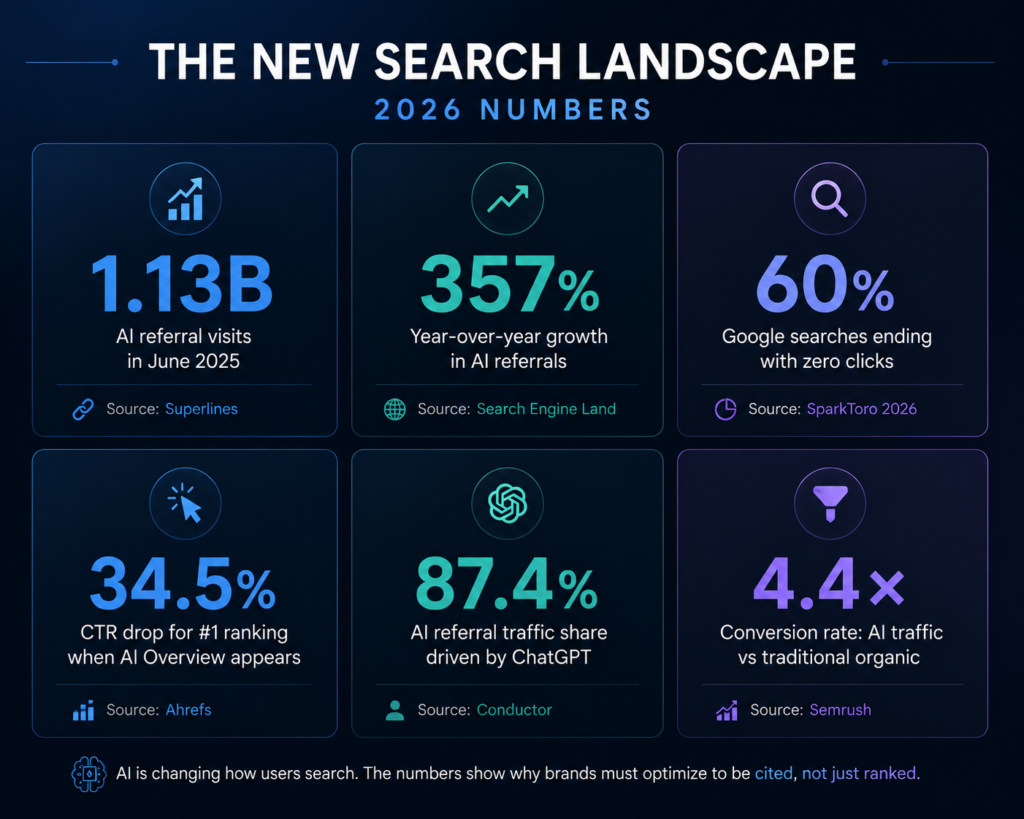
Significantly, and the effect is structural rather than temporary. Organic CTR drops 34.5–61% for queries where a Google AI Overview appears. 60% of Google searches end without a click to any website. Even queries without an AI Overview have seen organic CTR decline 41% year-over-year, as users increasingly go directly to ChatGPT or Perplexity and bypass Google altogether. Gartner projects 25% of organic search traffic will shift to AI chatbots and voice assistants by 2028. The businesses adapting now are building the citation footprints that will compound over that period.
What tools do I need to track AI search visibility?
Start with the free options: manual audits across ChatGPT, Perplexity, and Gemini, plus Google Search Console’s AI Mode filter. For scale, Semrush AI Toolkit, Ahrefs Brand Radar, Otterly.ai, and SE Ranking all offer AI citation monitoring. Set up a GA4 custom channel grouping for AI referral traffic to measure conversion rate and revenue contribution separately from traditional organic. For most businesses, the manual audit plus Search Console is sufficient for the first 60–90 days.
Is GEO replacing SEO, or do I need to do both?
Both — but the balance is shifting. GEO does not replace traditional SEO; it extends it. Most of the technical foundations are shared (crawlability, schema, site speed, E-E-A-T). What GEO adds is content structure optimised for AI extraction, authority-building beyond your domain, and platform-specific optimisation for ChatGPT, Perplexity, and AI Overviews. The businesses doing best in AI search are not abandoning traditional SEO — they are layering GEO on top of a solid SEO foundation, not treating them as alternatives.
Your team is probably already using AI: ChatGPT, Claude, Copilot, Gemini, or something built into your existing tools. And if they’re honest, about half the time it doesn’t quite work. The output is generic. It misses the point. It needs so much editing it would’ve been faster to just write it yourself.
That’s not an AI problem. It’s a prompting problem.
Prompt engineering is the skill of communicating with AI in a way that gets you consistent, usable results. No coding required. No technical background needed. It’s closer to writing a clear brief than writing software, and it’s the single highest-leverage skill a business team can develop right now.
The gap between “I tried ChatGPT and it was useless” and “AI saves me 8 hours a week” comes down to prompt quality, not AI capability. The same model producing generic output for one team delivers 340% ROI for another.
This guide is for the teams in the middle, the ones using AI but not getting enough from it. By the end, you’ll have a working framework, ready-to-use templates by department, and a clear understanding of what separates a weak prompt from one that actually works.
What Is Prompt Engineering, Really?
Prompt engineering is the practice of designing and refining the instructions you give an AI to get better, more consistent outputs.
Think of it as the skill of writing a good brief. A project manager who writes a vague creative brief gets vague creative work back. A PM who writes a specific, well-structured brief with context, constraints, and a clear output format gets something usable on the first pass.
AI works the same way.
The AI model itself isn’t changing. What changes is how clearly you communicate what you need. Organisations implementing structured prompt engineering frameworks report average productivity improvements of 67% across AI-enabled processes, while those using informal approaches see minimal gains despite similar technology investments.
The reason this matters for non-technical teams specifically: prompt engineering has nothing to do with writing code. It’s a communication skill. Your marketing team, HR managers, analysts, and account executives can all learn it in an afternoon, and start seeing different results the same day.
Why Your Team’s Prompts Probably Aren’t Working
There are three patterns that show up in almost every underperforming prompt:
Too vague. “Write a blog post about our product” tells the AI nothing about who’s reading it, what the goal is, what tone to use, or how long it should be. You get something technically correct and practically useless.
No context. AI doesn’t know your company, your customers, your brand voice, or what’s been tried before. If you don’t tell it, it guesses, and it guesses generically.
No format instruction. If you don’t tell the AI what format you want back, it will pick one. Sometimes that’s fine. Often it isn’t, you get a five-paragraph essay when you needed three bullet points for a Slack message.
Nearly every company is investing in AI, yet only 1% consider themselves at full maturity, meaning AI is fully integrated into workflows and driving substantial outcomes. The difference between organizations that simply use AI and those that achieve transformational results often comes down to one crucial skill: effective prompt engineering.
The fix for all three problems is the same: structure.
The RCTCO Formula: A Prompt Structure Any Team Can Use
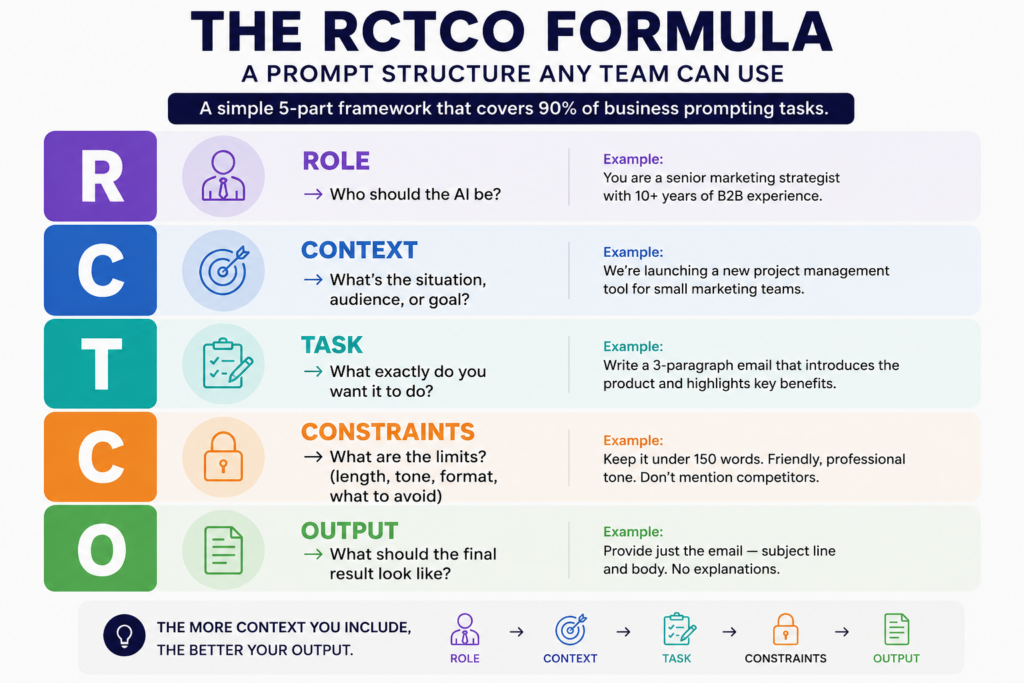
This is a five-part framework that covers 90% of business prompting tasks. You don’t need to use every element every time — but the more context you include, the better your output.
R — Role       → Who should the AI be?
C — Context    → What's the situation, audience, or goal?
T — Task       → What exactly do you want it to do?
C — Constraints → What are the limits? (length, tone, format, what to avoid)
O — Output     → What should the final result look like?
Example: Weak prompt vs. RCTCO prompt
Weak:
“Write an email to follow up with a client.”
RCTCO:
Role: You are a senior account manager at a B2B SaaS company. Context: A client attended our product demo 3 days ago but hasn’t responded to our follow-up. Task: Write a follow-up email that re-engages them without being pushy. Constraints: Keep it under 100 words. Friendly but professional tone. Don’t mention competitors. Output: Just the email subject line + body. No explanation needed.
The second prompt takes 30 seconds longer to write. It saves you 10 minutes of editing.
Prompt Templates by Department
These are copy-paste ready. Adjust the text in brackets for your context.
Marketing
Blog draft brief:
You are a content writer for [company name], a [describe your company] targeting [describe your audience]. Write a 600-word blog introduction on [topic]. Tone: [conversational / authoritative / educational]. Include a hook in the first sentence, one relevant stat, and end with a transition to the body. Do not use phrases like “In today’s world” or “It’s no secret that.”
Social media caption:
Write 3 LinkedIn caption options for a post about [topic]. Audience: B2B decision-makers in [industry]. Each caption should be under 150 words, start with a hook (no questions), and end without a generic CTA. Include one relevant stat in at least one version.
Sales
Prospect research summary:
I’m preparing for a sales call with [Company Name]. Based on what you know about [their industry], summarize:
Their likely top 3 operational challenges right now
How a company like ours ([brief description]) typically helps with those
Two smart discovery questions I can open with Keep it to one page.
Proposal summary:
You are a sales consultant. Rewrite the following proposal summary for a [industry] executive who has 3 minutes to read it. Prioritize ROI, timeline, and risk reduction. Max 200 words. No jargon. [Paste your current proposal text]
HR & People Ops
Job description:
Write a job description for a [Job Title] at our company. We are a [describe company]. The role reports to [manager title]. Key responsibilities: [list 3-5 bullet points]. Tone: Direct and welcoming. Avoid gendered language. Format: Intro paragraph → 5 responsibilities → 4 must-haves → 2 nice-to-haves → 1 closing sentence.
Performance review starter:
You are an experienced HR manager. I need to write a performance review for a team member who [brief description of their role and performance]. Write a draft that is honest, specific, and constructive. Strengths section: 3 paragraphs. Development areas: 2 paragraphs. Keep it professional but human. Avoid vague praise.
Operations & Analysis
Meeting summary:
Summarize the following meeting notes into:
A 3-sentence TL;DR
Key decisions made (bullet list)
Action items with owner names and deadlines
Any unresolved questions that need follow-up [Paste meeting notes]
Data interpretation:
You are a business analyst. Here is our [weekly/monthly] performance data: [paste data]. Identify the top 3 trends, flag any anomalies, and suggest 2 actions we should consider. Format as a table followed by a short narrative. Keep the narrative under 150 words.
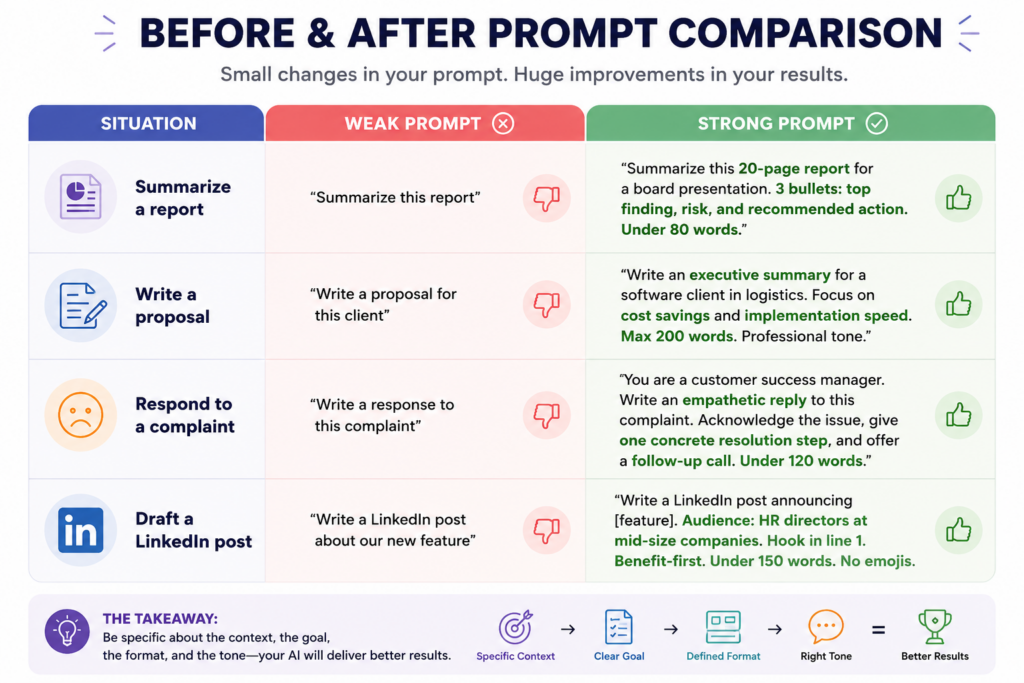
The Before & After: Weak vs. Strong Prompts
Instead of upgrading to bigger, costlier AI models, many businesses can get a 20–30% performance improvement simply by applying structured prompt engineering practices.
How to Build a Shared Prompt Library
Most teams start with individual people learning to prompt better. The ones that actually scale results build a shared library.
A prompt library is exactly what it sounds like: a shared document (Google Sheet, Notion page, or your CRM) where your team stores prompts that work — organised by department, use case, and last-tested date.
Why this matters:
Your best prompts don’t stay trapped in one person’s browser history
New team members get up to speed faster
You stop reinventing the same prompts repeatedly
You can test, improve, and version-control what works
Basic structure for a prompt library entry:
Use Case:        [What problem does this solve?]
Department:      [Which team uses this?]
The Prompt:      [Full prompt text — copy-paste ready]
Model Tested On: [ChatGPT-4o / Claude / Copilot etc.]
Output Quality:  [1–5 stars]
Last Updated:    [Date]
Notes:           [What works, what to watch out for]
One major trend in 2026 is the standardisation of prompt templates and reusable prompt libraries that enable consistent performance across applications. Enterprises increasingly invest in centralised prompt management platforms to maintain quality, compliance, and version control.
Start with 10 prompts. Review them monthly. Add what works. Delete what doesn’t.
💡 Download our free Prompt Starter Library template at the end of this article — includes 20 pre-built prompts for marketing, sales, HR, and ops, ready to drop into your team’s workflow.
Common Mistakes Teams Make (and How to Fix Them)
Mistake 1: Asking for too many things at once “Write a blog post, suggest three social captions, and give me a subject line for the email campaign.” That’s four tasks. Split them into four prompts. Each output will be better.
Mistake 2: Treating every output as final Your first prompt is a draft. The best way to improve an output is to prompt again — “Make this shorter,” “Change the tone to be less formal,” “Add a concrete example to the second paragraph.” Think of it as a conversation, not a one-shot order.
Mistake 3: Not telling the AI what to avoid If there are words, phrases, or approaches you don’t want, say so explicitly. “Don’t use bullet points.” “Avoid industry jargon.” “Don’t mention competitor names.” The AI will not assume.
Mistake 4: Ignoring the role instruction “Role assignment strategy” — giving AI a specific role to play — lets it draw on domain-specific knowledge and communication styles appropriate for that context. “You are a senior financial analyst” produces fundamentally different output than “You are a helpful assistant.” Use it every time.
Mistake 5: Using the same prompt across different AI tools Claude, ChatGPT, Gemini, and Copilot respond differently to the same prompt. A prompt tuned for ChatGPT may need slight adjustments for Claude. Test your best prompts across the tools your team actually uses.
You don’t need a data science team to measure this. Three simple metrics will tell you whether your team’s prompting is improving:
Time-to-usable-output — how long from prompt to a draft you’d actually send or publish? Track this informally for a week before and after introducing structured prompting.
Edit ratio — what percentage of an AI output do you change before using it? Good prompting should bring this below 30%. Most teams start above 60%.
Prompt reuse rate — how many times does a prompt from your library get used in a month? High reuse = the prompt is solving a real, recurring problem.
55% of non-technical users can achieve expert-level outputs with structured prompts. That number doesn’t happen by accident — it comes from teams that have invested a few hours in learning the framework and building their library.
Structured prompt processes reduce AI errors by up to 76%, and structured prompting correlates with 34% higher satisfaction in AI implementations.
Those aren’t small gains. They’re the difference between AI being a useful tool and AI being something people quietly stop using.
Your team is already paying for AI. Now make it work.
Most businesses are spending on AI tools and getting 20% of the value — because no one’s been shown how to use them properly.
We help business teams go from ad-hoc prompting to a structured, repeatable system that gets real results across marketing, sales, HR, and operations.
If you want us to run a prompt engineering workshop for your team or build a custom prompt library for your workflows — let’s talk →
No pitch. Just a conversation about where you’re at and whether we can help.
DOWNLOAD: Prompt Starter Kit
Get the Business Prompt Starter Kit — a free download with:
The RCTCO framework one-pager
20 copy-paste prompt templates across 4 departments
Prompt engineering is writing clear, structured instructions for an AI tool so it gives you useful, specific output instead of generic responses. It’s not a technical skill, it’s closer to writing a detailed brief for a contractor. The better your instructions, the better your result.
Do you need to know how to code to do prompt engineering?
No. Prompt engineering for business use is entirely non-technical. You’re writing natural language instructions, not code. If you can write a clear email brief or a project scope document, you have the core skill. What takes practice is knowing which elements to include and how specific to be.
How long does it take a business team to learn prompt engineering?
Most teams can learn the basics in a half-day workshop and see better results the same day. Building a shared prompt library and developing team-wide consistency takes 2–4 weeks of light practice. 68% of businesses now provide prompt engineering training to both technical and non-technical staff.
Which AI tools can you use prompt engineering with?
Prompt engineering applies to any large language model like ChatGPT, Claude, Google Gemini, Microsoft Copilot, or AI features built into tools like Salesforce, HubSpot, Notion, and others. The core principles are the same across all of them, though specific syntax may differ slightly.
What’s the difference between a prompt template and a prompt library?
A prompt template is a single reusable prompt structure for a specific task — like a fill-in-the-blank brief. A prompt library is a collection of tested templates organized by department and use case, stored somewhere your whole team can access and contribute to. Templates are the building blocks; a library is the system.
Can prompt engineering replace hiring an AI specialist?
For most day-to-day business tasks — content, analysis, communication, research — yes. Well-trained teams using structured prompting can handle most generative AI workloads without a dedicated AI specialist. Prompt engineering in 2026 is like Excel in 2000 — not necessarily a dedicated career, but an essential skill for knowledge workers. For complex deployments, agent workflows, or enterprise AI infrastructure, specialist support is still valuable.
What’s the biggest mistake businesses make with AI prompting?
Using the same vague, unstructured prompts they’d type into a search engine. AI isn’t a search engine — it responds to instructions. The teams getting the best results treat every prompt like a mini brief: they specify a role, give context, define the task, set constraints, and describe the output format. That habit alone accounts for most of the gap between AI that works and AI that wastes time.
There’s a line most companies haven’t crossed yet, and it’s not about having AI.
It’s about what the AI actually does.
For the past few years, “AI adoption” meant giving employees a chatbot, a writing assistant, or a dashboard with predictive analytics. The AI answered questions. Humans still made the decisions, ran the workflows, and did the follow-through.
That’s changing fast, and 2026 is the year where the gap between companies that understand the shift and companies that don’t will start to show up in actual business results.
The shift is calledagentic AI. Here’s what it actually means, why it matters to your business right now, and what to do about it.
What “Agentic AI” Actually Means (No Jargon)
An AI agent doesn’t just respond. It acts.
Give a standard AI a task, and it gives you an output. Give an agentic AI system a goal — it figures out the steps, uses the tools it has access to (databases, APIs, browsers, internal systems), executes across those steps, checks its own work, and adjusts when something goes wrong.
Think of the difference between an assistant who answers your question and an assistant who runs the whole project.
That’s what’s happening right now inside enterprise software. AI is moving from a layer you query to a layer that operates — handling customer service tickets end-to-end, writing and testing code, managing procurement approvals, detecting and responding to security threats — without waiting for a human to press “go” on each step.
The Numbers Business Leaders Should Know
This isn’t speculation. Here’s where the market actually stands in 2026:
That last number is the one to pay attention to. There’s a massive gap between organizations experimenting with agents and organizations actually deploying them in ways that move business metrics. That gap is where the competitive advantage is being built right now.
Why 2026 Is Different From Every Prior Year of “AI Hype”
Here’s what’s actually changed.
For most of 2023 and 2024, agentic AI was a compelling demo. The models were capable, but the infrastructure around them — the orchestration frameworks, governance tools, security layers, integration standards — wasn’t production-ready. Most pilots stalled.
That’s no longer the case.
The architecture has matured. Enterprises now have the orchestration frameworks, governance models, and observability platforms required to deploy AI agents in real workflows without losing control or accountability. The challenge in 2026 isn’t “can we build this?” — it’s “are we executing well enough?”
The ROI is measurable now.PwC estimates that AI agents can take on roughly half of the tasks in many business functions. That’s not a benchmark score — that’s an operational reality that forward-leaning organizations are already building around.
Where Agentic AI Is Actually Working Right Now
The use cases that have moved past pilot stage and into production:
Software Engineering Agent-assisted development is no longer about autocomplete. Development teams are deploying agents that write code, run tests, identify bugs, propose fixes, and open pull requests — reducing review cycles and shipping time in ways that compound over quarters, not years.
Customer Operations The most mature enterprise deployment area. AI agents handle intake, routing, research, and resolution for a significant percentage of support volume — not just the simple tickets, but complex multi-step requests that previously required a human to dig through four systems.
Financial Monitoring and Controls Agents that watch financial data in real time, flag anomalies, execute pre-approved responses (blocking a transaction, escalating a variance), and log the full decision trail for audit. The finance teams at organizations running these systems have shifted from catching problems after the fact to preventing them in the first place.
Security and Threat Response Autonomous agents that detect anomalous behavior, cross-reference threat intelligence, and initiate response protocols — all before a human analyst opens their laptop. Security teams are still in the loop, but their role has shifted from first responder to decision-maker on escalations.
The Honest Problem: Why Most Deployments Stall
Gartner has flagged that over 40% of agentic AI projects are at risk of cancellation by 2027. The reasons are consistent: escalating costs, unclear business value, and inadequate governance.
Here’s what’s actually happening in organizations that are stuck:
They started with the technology, not the workflow. The question “what can our AI agent do?” is less useful than “what specific business process costs us the most in time, errors, or headcount — and can an agent own part of it?” The organizations running agents in production started with the second question.
They underestimated the 80/20 problem. PwC’s analysis is direct: technology delivers about 20% of the value in an agentic initiative. The other 80% comes from redesigning work around it. Organizations that deployed agents into unchanged processes got unchanged results, just faster.
They skipped governance. Agents that can act can also act wrong — at scale, quickly, with consequences. The organizations that have successfully expanded agent autonomy over time are the ones that built governance into the design from day one: clear boundaries, audit trails, escalation paths, human checkpoints at high-stakes decision points.
What “Governance” Actually Means for Agents (Practically)
This is the part most leadership discussions skip, because it sounds like a compliance problem. It isn’t.
Agent governance is about knowing what your agents are doing, setting the right boundaries, and building the kind of accountability structure that lets you expand agent autonomy over time with confidence rather than restrict it after something goes wrong.
In practice, that means:
Permissions and scope boundaries — what systems can the agent access? What actions can it take independently versus what requires approval?
Audit trails — every agent action logged, with enough context to understand why it happened and who (or what) authorized it.
Escalation design — clear criteria for when an agent hands off to a human, and a handoff that doesn’t drop context.
Governance agents — a growing practice in 2026: deploying monitoring agents whose job is to watch other AI systems for policy violations and anomalous behavior.
The organizations that get this right don’t just reduce risk. They build the institutional confidence to deploy agents in higher-value scenarios — a compounding advantage.
The Strategic Decision You’re Actually Making
Most business leaders frame the agentic AI question as: should we adopt AI agents?
The better frame is: what happens to our competitive position if our peers deploy agentic systems in the next 12-18 months and we don’t?
In areas like customer operations, software development, and financial controls, organizations running mature agentic systems are operating with fundamentally different cost structures and speed profiles than those that aren’t. That gap doesn’t close easily once it opens.
The organizations that will come out ahead aren’t necessarily the first to deploy agents. They’re the ones that treat this as an operational design problem, not a technology project. That means:
Identifying the two or three workflows where agentic AI creates the most measurable business impact
Investing in the governance and integration infrastructure that makes production deployment sustainable
Building internal capability, not just vendor dependency
Measuring outcomes in business terms (cycle time, error rate, cost per transaction) from day one
The Bottom Line
Agentic AI is past the point of being a “watch this space” topic.
The market is moving. The infrastructure is ready. The early deployments have produced the playbooks. The organizations sitting in pilot mode through the rest of 2026 aren’t being cautious — they’re ceding ground.
The question isn’t whether AI agents will be part of how enterprise businesses operate. They already are. The question is whether your organization is building the capability to deploy them deliberately, govern them responsibly, and scale what works — or whether you’ll be catching up to organizations that started 18 months earlier.
That’s the decision in front of you right now. Curious where AI agents could fit in your business? Let’s find out together →
Frequently Asked Questions
Q1: What is agentic AI and how is it different from regular AI?
Regular AI responds to a prompt — it answers a question, generates text, or completes a task when you ask. Agentic AI acts autonomously toward a goal. It plans the steps, uses tools (like APIs, databases, or browsers), executes across multiple actions, checks its own output, and adjusts when something goes wrong — without a human triggering each step. The shift is from AI as a tool you use to AI as a system that operates on your behalf.
Q2: Is agentic AI ready for enterprise deployment in 2026?
For specific, well-defined workflows — yes. Customer support triage, software development assistance, financial monitoring, and security threat response all have mature production deployments in 2026. That said, Gartner notes that only 17% of organizations have fully deployed AI agents, and fully autonomous agents across complex, high-stakes workflows are still not ready for most enterprises. The key is scoping deployments to the right use cases and building proper governance before expanding.
Q3: What are the biggest risks of deploying AI agents in a business?
The three most common failure points are: (1) unclear business value — deploying agents without measurable outcomes tied to real business metrics; (2) insufficient governance — no audit trails, escalation paths, or human checkpoints for high-stakes decisions; and (3) unchanged workflows — dropping agents into existing processes without redesigning the work around them. Gartner warns that 40%+ of agentic AI projects risk cancellation by 2027 for exactly these reasons.
Q4: How much does agentic AI cost to implement?
Costs vary significantly by scope, vendor, and how much custom integration is required. Organizations that start with a single, well-defined workflow and build from there report the best ROI. The bigger cost risk isn’t licensing — it’s the time and resources spent on failed pilots. PwC’s research shows that 80% of the value in an agentic initiative comes from workflow redesign, not technology spend, which means your largest investment should be in process and change management, not software.
Q5: What industries are seeing the most traction with agentic AI right now?
Software and technology companies lead adoption, with AI agents most mature in software engineering and IT service management. Financial services organizations are deploying agents for monitoring, fraud detection, and compliance workflows. Customer-facing industries like retail, insurance, and telecoms are seeing strong results in customer operations. Healthcare is advancing in knowledge management and administrative workflows, while remaining cautious in clinical settings due to governance requirements.
Q6: How do I start with agentic AI without a large tech team?
Start with one workflow where the pain is clear and measurable — a process that costs significant time, has high error rates, or requires repetitive human effort. Many enterprise software platforms (Salesforce, ServiceNow, Microsoft 365) now have embedded AI agent capabilities that don’t require building from scratch. Pilot it with a governance design in place from day one, measure the outcome in business terms, and scale only what works. You don’t need a large AI team to start — you need a clear problem and disciplined measurement.
We use cookies on our website to give you the most relevant experience by remembering your preferences and repeat visits. By clicking “Accept”, you consent to the use of ALL the cookies.
This website uses cookies to improve your experience while you navigate through the website. Out of these, the cookies that are categorized as necessary are stored on your browser as they are essential for the working of basic functionalities of the website. We also use third-party cookies that help us analyze and understand how you use this website. These cookies will be stored in your browser only with your consent. You also have the option to opt-out of these cookies. But opting out of some of these cookies may affect your browsing experience.
Necessary cookies are absolutely essential for the website to function properly. These cookies ensure basic functionalities and security features of the website, anonymously.
Cookie
Duration
Description
cookielawinfo-checbox-analytics
11 months
This cookie is set by GDPR Cookie Consent plugin. The cookie is used to store the user consent for the cookies in the category "Analytics".
cookielawinfo-checbox-functional
11 months
The cookie is set by GDPR cookie consent to record the user consent for the cookies in the category "Functional".
cookielawinfo-checbox-others
11 months
This cookie is set by GDPR Cookie Consent plugin. The cookie is used to store the user consent for the cookies in the category "Other.
cookielawinfo-checkbox-necessary
11 months
This cookie is set by GDPR Cookie Consent plugin. The cookies is used to store the user consent for the cookies in the category "Necessary".
cookielawinfo-checkbox-performance
11 months
This cookie is set by GDPR Cookie Consent plugin. The cookie is used to store the user consent for the cookies in the category "Performance".
viewed_cookie_policy
11 months
The cookie is set by the GDPR Cookie Consent plugin and is used to store whether or not user has consented to the use of cookies. It does not store any personal data.
Functional cookies help to perform certain functionalities like sharing the content of the website on social media platforms, collect feedbacks, and other third-party features.
Performance cookies are used to understand and analyze the key performance indexes of the website which helps in delivering a better user experience for the visitors.
Analytical cookies are used to understand how visitors interact with the website. These cookies help provide information on metrics the number of visitors, bounce rate, traffic source, etc.
Advertisement cookies are used to provide visitors with relevant ads and marketing campaigns. These cookies track visitors across websites and collect information to provide customized ads.