Your team is probably already using AI: ChatGPT, Claude, Copilot, Gemini, or something built into your existing tools. And if they’re honest, about half the time it doesn’t quite work. The output is generic. It misses the point. It needs so much editing it would’ve been faster to just write it yourself.
That’s not an AI problem. It’s a prompting problem.
Prompt engineering is the skill of communicating with AI in a way that gets you consistent, usable results. No coding required. No technical background needed. It’s closer to writing a clear brief than writing software, and it’s the single highest-leverage skill a business team can develop right now.
The gap between “I tried ChatGPT and it was useless” and “AI saves me 8 hours a week” comes down to prompt quality, not AI capability. The same model producing generic output for one team delivers 340% ROI for another.
This guide is for the teams in the middle, the ones using AI but not getting enough from it. By the end, you’ll have a working framework, ready-to-use templates by department, and a clear understanding of what separates a weak prompt from one that actually works.
What Is Prompt Engineering, Really?
Prompt engineering is the practice of designing and refining the instructions you give an AI to get better, more consistent outputs.
Think of it as the skill of writing a good brief. A project manager who writes a vague creative brief gets vague creative work back. A PM who writes a specific, well-structured brief with context, constraints, and a clear output format gets something usable on the first pass.
AI works the same way.
The AI model itself isn’t changing. What changes is how clearly you communicate what you need. Organisations implementing structured prompt engineering frameworks report average productivity improvements of 67% across AI-enabled processes, while those using informal approaches see minimal gains despite similar technology investments.
The reason this matters for non-technical teams specifically: prompt engineering has nothing to do with writing code. It’s a communication skill. Your marketing team, HR managers, analysts, and account executives can all learn it in an afternoon, and start seeing different results the same day.
Why Your Team’s Prompts Probably Aren’t Working
There are three patterns that show up in almost every underperforming prompt:
- Too vague. “Write a blog post about our product” tells the AI nothing about who’s reading it, what the goal is, what tone to use, or how long it should be. You get something technically correct and practically useless.
- No context. AI doesn’t know your company, your customers, your brand voice, or what’s been tried before. If you don’t tell it, it guesses, and it guesses generically.
- No format instruction. If you don’t tell the AI what format you want back, it will pick one. Sometimes that’s fine. Often it isn’t, you get a five-paragraph essay when you needed three bullet points for a Slack message.
Nearly every company is investing in AI, yet only 1% consider themselves at full maturity, meaning AI is fully integrated into workflows and driving substantial outcomes. The difference between organizations that simply use AI and those that achieve transformational results often comes down to one crucial skill: effective prompt engineering.
The fix for all three problems is the same: structure.
The RCTCO Formula: A Prompt Structure Any Team Can Use
This is a five-part framework that covers 90% of business prompting tasks. You don’t need to use every element every time — but the more context you include, the better your output.
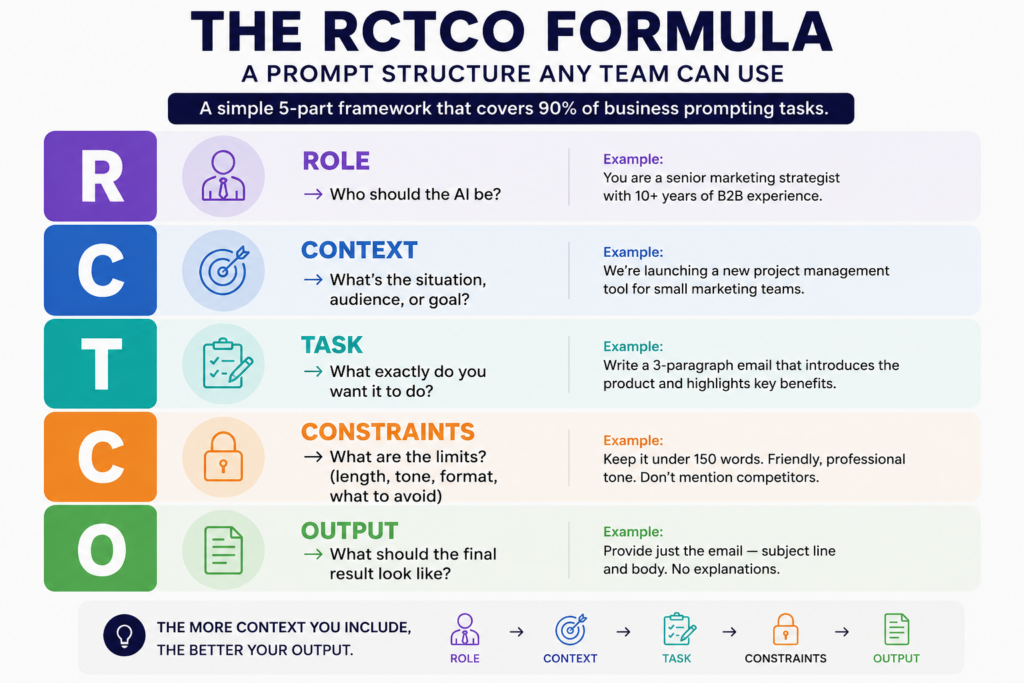
R — Role       → Who should the AI be?
C — Context    → What's the situation, audience, or goal?
T — Task       → What exactly do you want it to do?
C — Constraints → What are the limits? (length, tone, format, what to avoid)
O — Output     → What should the final result look like?
Example: Weak prompt vs. RCTCO prompt
Weak:
“Write an email to follow up with a client.”
RCTCO:
Role: You are a senior account manager at a B2B SaaS company.
Context: A client attended our product demo 3 days ago but hasn’t responded to our follow-up. Task: Write a follow-up email that re-engages them without being pushy. Constraints: Keep it under 100 words. Friendly but professional tone. Don’t mention competitors.
Output: Just the email subject line + body. No explanation needed.
The second prompt takes 30 seconds longer to write. It saves you 10 minutes of editing.
Prompt Templates by Department
These are copy-paste ready. Adjust the text in brackets for your context.
Marketing
Blog draft brief:
You are a content writer for [company name], a [describe your company] targeting [describe your audience]. Write a 600-word blog introduction on [topic]. Tone: [conversational / authoritative / educational]. Include a hook in the first sentence, one relevant stat, and end with a transition to the body. Do not use phrases like “In today’s world” or “It’s no secret that.”
Social media caption:
Write 3 LinkedIn caption options for a post about [topic]. Audience: B2B decision-makers in [industry]. Each caption should be under 150 words, start with a hook (no questions), and end without a generic CTA. Include one relevant stat in at least one version.
Sales
Prospect research summary:
I’m preparing for a sales call with [Company Name]. Based on what you know about [their industry], summarize:
- Their likely top 3 operational challenges right now
- How a company like ours ([brief description]) typically helps with those
- Two smart discovery questions I can open with Keep it to one page.
Proposal summary:
You are a sales consultant. Rewrite the following proposal summary for a [industry] executive who has 3 minutes to read it. Prioritize ROI, timeline, and risk reduction. Max 200 words. No jargon. [Paste your current proposal text]
HR & People Ops
Job description:
Write a job description for a [Job Title] at our company. We are a [describe company]. The role reports to [manager title]. Key responsibilities: [list 3-5 bullet points]. Tone: Direct and welcoming. Avoid gendered language. Format: Intro paragraph → 5 responsibilities → 4 must-haves → 2 nice-to-haves → 1 closing sentence.
Performance review starter:
You are an experienced HR manager. I need to write a performance review for a team member who [brief description of their role and performance]. Write a draft that is honest, specific, and constructive. Strengths section: 3 paragraphs. Development areas: 2 paragraphs. Keep it professional but human. Avoid vague praise.
Operations & Analysis
Meeting summary:
Summarize the following meeting notes into:
- A 3-sentence TL;DR
- Key decisions made (bullet list)
- Action items with owner names and deadlines
- Any unresolved questions that need follow-up [Paste meeting notes]
Data interpretation:
You are a business analyst. Here is our [weekly/monthly] performance data: [paste data]. Identify the top 3 trends, flag any anomalies, and suggest 2 actions we should consider. Format as a table followed by a short narrative. Keep the narrative under 150 words.
The Before & After: Weak vs. Strong Prompts
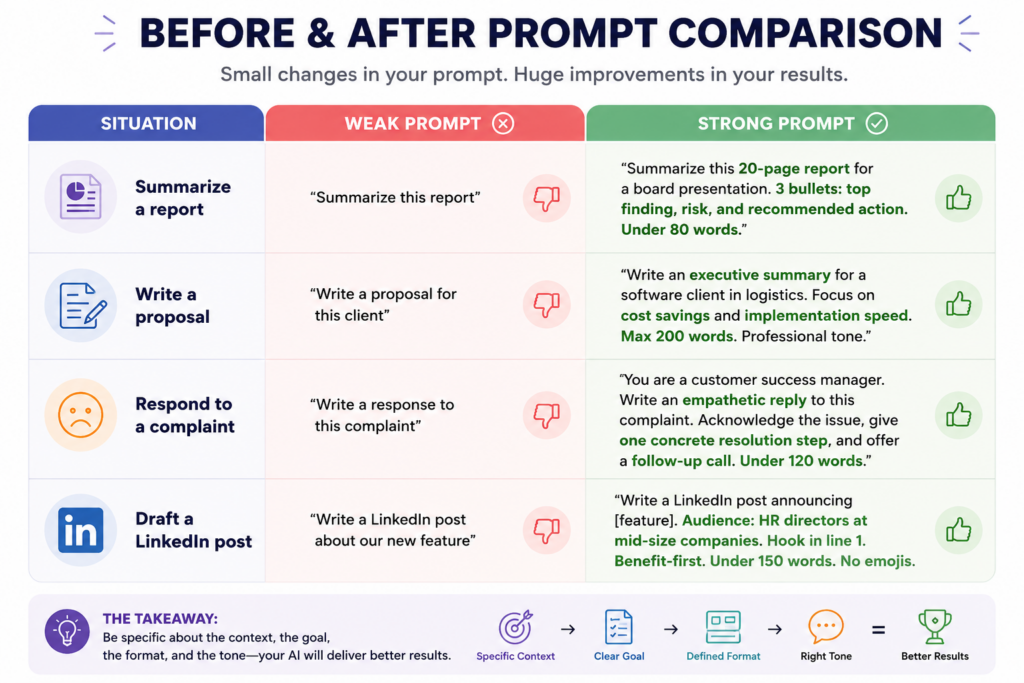
Instead of upgrading to bigger, costlier AI models, many businesses can get a 20–30% performance improvement simply by applying structured prompt engineering practices.
How to Build a Shared Prompt Library
Most teams start with individual people learning to prompt better. The ones that actually scale results build a shared library.
A prompt library is exactly what it sounds like: a shared document (Google Sheet, Notion page, or your CRM) where your team stores prompts that work — organised by department, use case, and last-tested date.
Why this matters:
- Your best prompts don’t stay trapped in one person’s browser history
- New team members get up to speed faster
- You stop reinventing the same prompts repeatedly
- You can test, improve, and version-control what works
Basic structure for a prompt library entry:
Use Case:        [What problem does this solve?]
Department:      [Which team uses this?]
The Prompt:      [Full prompt text — copy-paste ready]
Model Tested On: [ChatGPT-4o / Claude / Copilot etc.]
Output Quality:  [1–5 stars]
Last Updated:    [Date]
Notes:           [What works, what to watch out for]
One major trend in 2026 is the standardisation of prompt templates and reusable prompt libraries that enable consistent performance across applications. Enterprises increasingly invest in centralised prompt management platforms to maintain quality, compliance, and version control.
Start with 10 prompts. Review them monthly. Add what works. Delete what doesn’t.
💡 Download our free Prompt Starter Library template at the end of this article — includes 20 pre-built prompts for marketing, sales, HR, and ops, ready to drop into your team’s workflow.
Common Mistakes Teams Make (and How to Fix Them)
- Mistake 1: Asking for too many things at once “Write a blog post, suggest three social captions, and give me a subject line for the email campaign.” That’s four tasks. Split them into four prompts. Each output will be better.
- Mistake 2: Treating every output as final Your first prompt is a draft. The best way to improve an output is to prompt again — “Make this shorter,” “Change the tone to be less formal,” “Add a concrete example to the second paragraph.” Think of it as a conversation, not a one-shot order.
- Mistake 3: Not telling the AI what to avoid If there are words, phrases, or approaches you don’t want, say so explicitly. “Don’t use bullet points.” “Avoid industry jargon.” “Don’t mention competitor names.” The AI will not assume.
- Mistake 4: Ignoring the role instruction “Role assignment strategy” — giving AI a specific role to play — lets it draw on domain-specific knowledge and communication styles appropriate for that context. “You are a senior financial analyst” produces fundamentally different output than “You are a helpful assistant.” Use it every time.
- Mistake 5: Using the same prompt across different AI tools Claude, ChatGPT, Gemini, and Copilot respond differently to the same prompt. A prompt tuned for ChatGPT may need slight adjustments for Claude. Test your best prompts across the tools your team actually uses.
OpenAI’s official prompt engineering guide covers model-specific nuances worth bookmarking
Measuring the ROI of Better Prompting
You don’t need a data science team to measure this. Three simple metrics will tell you whether your team’s prompting is improving:
- Time-to-usable-output — how long from prompt to a draft you’d actually send or publish? Track this informally for a week before and after introducing structured prompting.
- Edit ratio — what percentage of an AI output do you change before using it? Good prompting should bring this below 30%. Most teams start above 60%.
- Prompt reuse rate — how many times does a prompt from your library get used in a month? High reuse = the prompt is solving a real, recurring problem.
55% of non-technical users can achieve expert-level outputs with structured prompts. That number doesn’t happen by accident — it comes from teams that have invested a few hours in learning the framework and building their library.
Structured prompt processes reduce AI errors by up to 76%, and structured prompting correlates with 34% higher satisfaction in AI implementations.
Those aren’t small gains. They’re the difference between AI being a useful tool and AI being something people quietly stop using.
Your team is already paying for AI. Now make it work.
Most businesses are spending on AI tools and getting 20% of the value — because no one’s been shown how to use them properly.
We help business teams go from ad-hoc prompting to a structured, repeatable system that gets real results across marketing, sales, HR, and operations.
If you want us to run a prompt engineering workshop for your team or build a custom prompt library for your workflows — let’s talk →
No pitch. Just a conversation about where you’re at and whether we can help.
DOWNLOAD: Prompt Starter Kit
Get the Business Prompt Starter Kit — a free download with:
- The RCTCO framework one-pager
- 20 copy-paste prompt templates across 4 departments
- Blank prompt library template (Google Sheets format)
- Before & after prompt comparison card
Download the Prompt Starter Kit →
Frequently Asked Questions
Prompt engineering is writing clear, structured instructions for an AI tool so it gives you useful, specific output instead of generic responses. It’s not a technical skill, it’s closer to writing a detailed brief for a contractor. The better your instructions, the better your result.
No. Prompt engineering for business use is entirely non-technical. You’re writing natural language instructions, not code. If you can write a clear email brief or a project scope document, you have the core skill. What takes practice is knowing which elements to include and how specific to be.
Most teams can learn the basics in a half-day workshop and see better results the same day. Building a shared prompt library and developing team-wide consistency takes 2–4 weeks of light practice. 68% of businesses now provide prompt engineering training to both technical and non-technical staff.
Prompt engineering applies to any large language model like ChatGPT, Claude, Google Gemini, Microsoft Copilot, or AI features built into tools like Salesforce, HubSpot, Notion, and others. The core principles are the same across all of them, though specific syntax may differ slightly.
A prompt template is a single reusable prompt structure for a specific task — like a fill-in-the-blank brief. A prompt library is a collection of tested templates organized by department and use case, stored somewhere your whole team can access and contribute to. Templates are the building blocks; a library is the system.
For most day-to-day business tasks — content, analysis, communication, research — yes. Well-trained teams using structured prompting can handle most generative AI workloads without a dedicated AI specialist. Prompt engineering in 2026 is like Excel in 2000 — not necessarily a dedicated career, but an essential skill for knowledge workers. For complex deployments, agent workflows, or enterprise AI infrastructure, specialist support is still valuable.
Using the same vague, unstructured prompts they’d type into a search engine. AI isn’t a search engine — it responds to instructions. The teams getting the best results treat every prompt like a mini brief: they specify a role, give context, define the task, set constraints, and describe the output format. That habit alone accounts for most of the gap between AI that works and AI that wastes time.