What Is a RAG Pipeline and Why Does Your Business Need One?
A RAG pipeline is a system that connects an AI language model to your own documents and data at the moment it answers a question. Instead of relying on its training data alone, the AI retrieves relevant information from your knowledge base first, then generates an answer grounded in what it just found.
Think of it this way. A standard AI model is like a very smart employee who read everything published on the internet up to a certain date but has never seen a single internal document from your company. A RAG-powered AI is like that same employee, except now they can instantly search your entire document library, find the most relevant pages, and base their answer on what they find there.
Why Hallucination Is a Business Problem, Not Just a Technical One
The consequence of deploying AI without RAG is not just inaccurate answers. It is inaccurate answers delivered with full confidence, at scale, to your customers, employees, and decision-makers. Context-graph-grounded RAG achieves up to 5x improvements in AI analyst response accuracy over ungrounded models. That accuracy gap is the difference between AI that creates trust and AI that destroys it.Furthermore, the market reflects how seriously businesses take this problem. The global RAG market reached USD 3.33 billion in 2026 and is projected to expand to USD 81.51 billion by 2035, at a compound annual growth rate of 42.7%. That is not a niche technology trend. It is infrastructure adoption at the same scale as cloud computing in the early 2010s.What RAG Actually Does in Plain Language
When a user submits a question to a RAG-powered system, three things happen in sequence. First, the system converts the question into a mathematical representation and searches your knowledge base for the most semantically relevant documents. Second, it pulls the best matching content into the model’s context. Third, the model generates an answer based on what it just retrieved, rather than what it was trained on months or years ago.
The result is an AI that can answer questions about your specific business, cite the source it used, and stay current as your documents change, without requiring expensive model retraining.
RAG vs Fine-Tuning: Why Most Businesses Choose RAG
RAG and fine-tuning are both methods for making an AI model more useful for a specific domain. However, they solve different problems, at very different costs. For most business use cases, RAG is the right choice — and understanding why will save you months of wasted effort. Fine-tuning means retraining a model on your data to bake knowledge into its weights permanently. It is expensive, slow, and produces a model that goes stale the moment your knowledge base changes, requiring another expensive retraining cycle. RAG, by contrast, keeps knowledge separate from the model entirely. Because RAG separates knowledge from model weights, knowledge base updates never require model retraining. You add a document to your knowledge base, and the system can use it immediately at the next query.When Each Approach Makes Sense
Fine-tuning makes sense when you need the model to behave differently, adopting a specific writing style, following a particular reasoning pattern, or producing structured outputs in a proprietary format. It changes how the model thinks and speaks.
RAG makes sense when you need the model to know different things, specifically your internal documents, recent data, product information, or any knowledge that changes over time. According to Vectara, enterprises choose RAG for 30 to 60% of use cases requiring high accuracy, transparency, and custom data handling.For most businesses deploying AI on internal knowledge, customer data, or operational documents, RAG is the right architecture. Fine-tuning is the layer you add later, if at all.
The IDEA Pipeline: A Business Framework for RAG
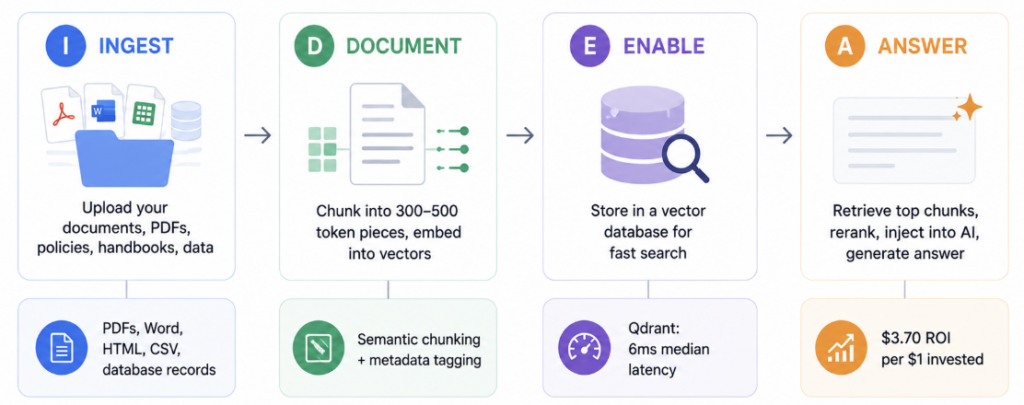
The IDEA Pipeline is a four-stage framework for building a RAG system on your business knowledge base. Each stage maps to a concrete technical component, but each one also has a clear business decision at its core.
I — Ingest → What knowledge does your AI need access to?
D — Document → How do you prepare and index that knowledge?
E — Enable → Where and how do you store it for fast retrieval?
A — Answer → How does the AI retrieve, rank, and generate responses?
The reason most business RAG projects fail is not technical. It is that teams skip the first stage, dump unstructured data into a pipeline, and wonder why the outputs are unreliable. The IDEA framework forces you to start with the knowledge question before touching the infrastructure question.
Step 1: Ingest — Building Your Knowledge Base
The first stage of a RAG pipeline is deciding what knowledge your AI should have access to, and then ingesting it into a form the pipeline can process. The quality of your RAG output is entirely determined by the quality of what you put in.
RAG does not fix bad data. It amplifies it. When the retrieval corpus is ungoverned — stale documents sitting alongside current ones, missing metadata, unresolved duplicates — the system produces confident wrong answers at scale.What to Include in Your Knowledge Base
Start by identifying the documents that answer the questions your users actually ask. For most businesses, the highest-value sources fall into a few categories. Internal policy and procedure documents, including HR handbooks, compliance guides, and operational SOPs, are typically the first layer. Product documentation, including specifications, FAQs, pricing sheets, and release notes, forms the second. Customer-facing knowledge, including support tickets, case studies, and onboarding materials, forms the third.
Resist the temptation to ingest everything. A tightly curated knowledge base of 500 high-quality documents consistently outperforms a sprawling corpus of 50,000 poorly governed ones.
What Document Formats RAG Supports
Modern RAG frameworks handle most common document formats natively. PDFs, Word documents, HTML pages, Markdown files, plain text, CSV files, and structured database records can all feed into a pipeline using document parsers like Apache Tika or Unstructured.io. The ingestion stage converts raw files into clean text that the subsequent stages can process.
Governance: The Step Most Teams Skip
Every document in your knowledge base needs ownership. Someone must be responsible for keeping it current, flagging it for removal when it becomes outdated, and tagging it with the metadata that retrieval systems use to filter results accurately. Without governance, your knowledge base becomes unreliable within months, not years.
Step 2: Document — Chunking and Embedding Your Content
The second stage converts your cleaned documents into a form that retrieval systems can search semantically. This involves two processes: chunking, which breaks documents into retrievable pieces, and embedding, which converts those pieces into numerical representations that capture meaning.
What Chunking Actually Means
An embedding model cannot process an entire document as a single unit. Instead, the pipeline splits each document into smaller segments called chunks. Chunks are typically 300 to 500 tokens, depending on the model and content type, and each chunk should carry metadata such as topic, date, and source so that retrieval can filter and rank results more effectively.The chunking strategy matters more than most teams expect. Chunks that are too small lose context. Chunks that are too large dilute relevance. Semantic chunking, which splits on meaning rather than character count, consistently outperforms fixed-size approaches for business knowledge bases.
What Embedding Models Do
Once documents are chunked, an embedding model converts each chunk into a vector, a list of numbers that represents the semantic meaning of that text. Similar ideas produce vectors that are close together in mathematical space. When a user asks a question, the pipeline embeds the question using the same model, then searches for chunks whose vectors are closest to the question’s vector.
For most businesses, OpenAI’s text-embedding-3-small at $0.02 per million tokens offers the best commercial value. For organizations with data privacy requirements, self-hosted models like BGE-large-en-v1.5 provide strong performance without sending data to external APIs.Step 3: Enable — Setting Up Your Vector Database
A vector database stores your document embeddings and enables fast similarity search at query time. It is the retrieval engine at the heart of your RAG pipeline. Choosing the right one depends on your scale, budget, and data privacy requirements.
The Leading Vector Database Options in 2026
72% of enterprises now run RAG in production. Qdrant achieves 6ms median latency and, together with hybrid search, boosts retrieval recall by 17% compared to vector-only approaches.The main options each suit different situations. Pinecone is fully managed, requires no infrastructure overhead, and suits teams that want to move fast without owning the infrastructure. Qdrant is open-source, self-hostable, and delivers exceptional performance for organizations with data sensitivity requirements or high query volumes. Weaviate handles both vector and traditional keyword search natively and suits knowledge bases with mixed structured and unstructured content. ChromaDB is lightweight, developer-friendly, and ideal for prototyping or smaller-scale deployments before committing to production infrastructure.
Hybrid Search: The Setup Most Teams Miss
Pure vector search finds semantically similar content but can miss exact keyword matches. Pure keyword search finds exact matches but misses conceptual relationships. Combining vector search with sparse retrieval using BM25 and applying reciprocal rank fusion produces the strongest retrieval results for production RAG deployments.If you configure only one thing beyond a basic vector store, make it hybrid search. For most business knowledge bases, it delivers meaningfully better retrieval accuracy than either approach alone.
Step 4: Answer — Retrieval, Reranking, and Generation
The final stage is what users experience directly. When a query arrives, the pipeline retrieves the most relevant chunks, reranks them by relevance score, injects them into the model’s context, and generates a grounded response. The quality of this stage determines whether users trust the system.
Retrieval and Reranking
At query time, the pipeline searches the vector database for the top matching chunks, typically the top 5 to 20, depending on the model’s context window. However, raw vector similarity does not always produce the best ordering. Reranking models, such as Cohere’s rerank-v3, take the initial retrieval results and rescore them based on a deeper relevance assessment before they reach the generation model.
The production RAG standard in 2026 includes five core components: data ingestion and preparation, chunking and indexing, query transformation, retrieval and reranking, and continuous evaluation and monitoring. Most business deployments that fail do so because they implement the first three and skip the last two.Generation and Citation
The retrieved chunks, combined with the original query, pass into the language model as context. The model generates a response grounded in what it just retrieved, not in its training data. Well-configured RAG systems also surface citations, telling the user which document the answer came from, which is essential for compliance-sensitive use cases like legal, finance, and healthcare.
Agentic RAG: The Direction Everything Is Moving
Agentic RAG integrates retrieval into multi-step agent loops where a model iteratively retrieves, reasons, and decides whether more retrieval is needed before generating a final response. Rather than one retrieval pass per query, an agentic system decides dynamically how many retrieval steps a question requires, making it dramatically more capable on complex, multi-part questions.For businesses building RAG in 2026, starting with a standard pipeline and planning for an agentic upgrade is the right sequencing. The foundational architecture is the same. Agentic RAG adds an orchestration layer on top.
The 5 Highest-ROI Use Cases for Business RAG in 2026
RAG projects return roughly $3.70 for every $1 invested, reflecting time savings, faster support resolution, and reduced escalations. However, not all use cases deliver equal returns. The following five deliver the fastest payback.1. Internal Knowledge Assistants
Employees spend a significant portion of their working week searching for information that already exists inside the organization. A RAG-powered internal assistant, connected to policy documents, HR handbooks, project notes, and operational procedures, reduces that friction to seconds per query. New employee onboarding time falls. Support escalations fall. Decision-making accelerates.
2. Customer Support Automation
RAG-powered customer support assistants improve resolution accuracy by retrieving the latest product manuals, ticket histories, and troubleshooting guides at query time. The result is consistent, accurate answers regardless of which agent, human or AI, handles the interaction.3. Compliance and Legal Document Search
In legal, healthcare, and finance sectors, the document retrieval segment accounted for 32.4% of global RAG revenue in 2024, as these industries require quick access to specific information within vast document repositories. RAG enables precise retrieval across thousands of pages of regulatory text, ensuring outputs cite the correct clauses and versions. This directly reduces compliance risk.4. Sales Enablement
Sales teams carry an enormous amount of institutional knowledge in their heads, knowledge that leaves with them when they move on. RAG pipelines connected to CRM notes, proposal libraries, competitive intelligence, and product specifications give every sales rep access to the best answers from your best performers, on demand.
5. Business Intelligence and Reporting
RAG can connect to structured data sources, transforming financial models, spreadsheets, and BI dashboards into queryable knowledge. Instead of waiting for an analyst to run a query, a business leader asks a question in natural language and receives a grounded, sourced answer in seconds.
Common Mistakes That Kill RAG Projects
Mistake 1: Skipping Data Governance
The single most common reason enterprise RAG projects fail is ungoverned data. Teams ingest everything, including outdated documents, duplicated files, and conflicting sources, and then wonder why the AI gives inconsistent answers. Curate before you ingest. Assign document owners. Set an update cadence.
Mistake 2: Not Evaluating Retrieval Quality Separately From Answer Quality
These are two distinct failure points. A RAG system can retrieve the right documents and still generate a poor answer. Alternatively, it can generate a fluent answer from the wrong documents. Both need monitoring, and they need separate metrics. Retrieval quality measures whether the right chunks come back. Answer quality measures whether the response is accurate and grounded.
Mistake 3: Ignoring Chunk Size and Metadata
Fixed-size chunking applied uniformly across all document types consistently underperforms semantic chunking. Additionally, chunks without metadata, specifically source, date, and topic tags, cannot be filtered during retrieval. The model therefore retrieves chunks without any ability to prioritize recent content over stale content, or internal policy over general reference material.
Mistake 4: Building Without Monitoring
Production RAG pipelines require continuous monitoring of both retrieval quality and answer fidelity, with latency targets such as Time-to-First-Token at the 90th percentile under 2 seconds. Without monitoring, quality degrades silently as your knowledge base grows and changes, and you discover the problem when a user reports a serious error rather than in your metrics.How to Build a RAG Pipeline Without a Data Science Team
Modern RAG platforms have reduced the technical barrier significantly. Non-technical teams can deploy functional RAG systems using no-code and low-code tools, while technical teams can use open-source frameworks to build production-grade pipelines. The right starting point depends on your scale and requirements.
No-Code and Low-Code Options
Several platforms now offer RAG-as-a-service with document upload, automatic chunking and embedding, and a chat interface, all configurable without writing a line of code. The leading options include Notion AI for teams already living in Notion, Microsoft Copilot for organizations in the Microsoft 365 ecosystem, expert and Confluence AI for existing knowledge base users, and ChatGPT Enterprise with file upload for quick prototyping.
These tools abstract away the infrastructure entirely. The tradeoff is less control over chunking strategy, embedding models, and retrieval tuning, which matters more as your use case becomes more complex.
Open-Source Frameworks for Technical Teams
Teams with engineering resources have access to mature, production-tested frameworks. LangChain and LlamaIndex are the two dominant orchestration frameworks, offering recursive text splitters, document loaders, vector store integrations, and retrieval chain components that assemble into a full pipeline.Both frameworks support the major vector databases, the leading embedding models, and a growing ecosystem of evaluation and monitoring tools. LlamaIndex tends to be preferred for document-heavy knowledge base use cases. LangChain tends to be preferred for agent-based and multi-chain workflows.
The Recommended Starting Path
Start with a managed platform and a single, high-value use case. Prove the ROI. Then graduate to an open-source framework when your volume, accuracy requirements, or data privacy needs outgrow the managed solution. Almost every successful enterprise RAG deployment followed this sequence.
Your AI is only as useful as the knowledge you give it.
Most businesses deploy AI on top of their existing data and get mediocre results. The reason is almost never the AI model. It is the absence of a structured, governed knowledge pipeline connecting the model to the right information at the right time.
We help businesses design and implement RAG pipelines that connect their AI to the knowledge that actually drives decisions, customer answers, and operational efficiency.
If you want to talk through what a RAG pipeline would look like for your specific use case, let’s start with a conversation.Frequently Asked Questions
A RAG pipeline is a system that connects an AI language model to your own documents and data. When someone asks the AI a question, it first searches your knowledge base for the most relevant information, then generates an answer based on what it finds. This grounds the response in your actual business data rather than in the model’s general training, which reduces hallucination and keeps answers current without requiring model retraining.
Uploading files to ChatGPT is a simple, session-specific version of retrieval. A proper RAG pipeline is a persistent, scalable architecture. It stores embeddings permanently in a vector database, supports thousands of documents, enables filtering by metadata, applies reranking for accuracy, and integrates into your existing applications via API. File upload works for ad-hoc queries. A RAG pipeline works for production workflows with many users and ongoing knowledge updates.
Not necessarily. No-code platforms like Microsoft Copilot, Notion AI, and ChatGPT Enterprise allow teams to build functional RAG systems without writing code. For more control over accuracy, data privacy, or integration with existing systems, open-source frameworks like LangChain and LlamaIndex require engineering resources. The right choice depends on your scale, budget, and technical requirements.
Fine-tuning changes how a model thinks and speaks by retraining it on your data. RAG changes what a model knows by connecting it to an external knowledge base at query time. Fine-tuning is expensive, produces a static result that goes stale, and is best for changing model behavior. RAG is cost-effective, stays current as documents change, and is best for giving the model access to your specific knowledge. Most business use cases call for RAG, not fine-tuning.
Costs range widely. No-code platforms typically cost between $20 and $100 per user per month with no infrastructure overhead. Open-source deployments incur embedding costs (OpenAI’s text-embedding-3-small costs $0.02 per million tokens), vector database hosting (Pinecone’s starter tier is free, production tiers start around $70 per month), and engineering time to build and maintain the pipeline. Most small-to-mid-size business deployments come in under $500 per month in infrastructure costs once built.
Modern RAG pipelines handle virtually any document format, including PDFs, Word documents, PowerPoint files, Excel spreadsheets, HTML pages, Markdown files, plain text, CSV data, and structured database records. Parsing tools like Apache Tika and Unstructured.io convert these into clean text that the pipeline can chunk and embed. The main constraint is not file format but data quality: clean, current, well-governed documents produce far better retrieval results than unstructured dumps of mixed-quality files.
A no-code prototype can be running in a day. A production-grade open-source pipeline typically takes two to six weeks, depending on the complexity of your knowledge base, the number of document sources, and the integration requirements with existing systems. The longest phase is usually data preparation, specifically cleaning, tagging, and governing your knowledge base before ingestion, which often takes as long as the technical build itself.